

StrumForge features

Turn practice into music.

Write chord progressions, connect the fretboard, and sharpen your timing. StrumForge brings guitar practice tools and customizable drum backing into one place, with interactive diagrams and playback that make every session more musical.

Free to start on web, iPhone, iPad, and Android. Unlock the full toolkit with StrumForge Pro.

01 · Songwriting & rhythm

Guitar chord progression generator

Find a starting point worth playing.

Create a progression, hear it with a groove, and shape it into your own song or practice loop. Playable diagrams keep every chord connected to your guitar.

  • Choose your key, mode, and style; filter open, barre, triad, or power chord shapes.
  • Add sevenths, suspended chords, and add9 color. Lock chords you love or replace one by hand.
  • Build four-chord loops, or expand to 8, 12, and 16 chords with Pro.

Hear the whole idea in time

Adjust tempo, drum groove, and guitar sound. Follow the active chord as playback moves through the progression.

Explore chord progressions
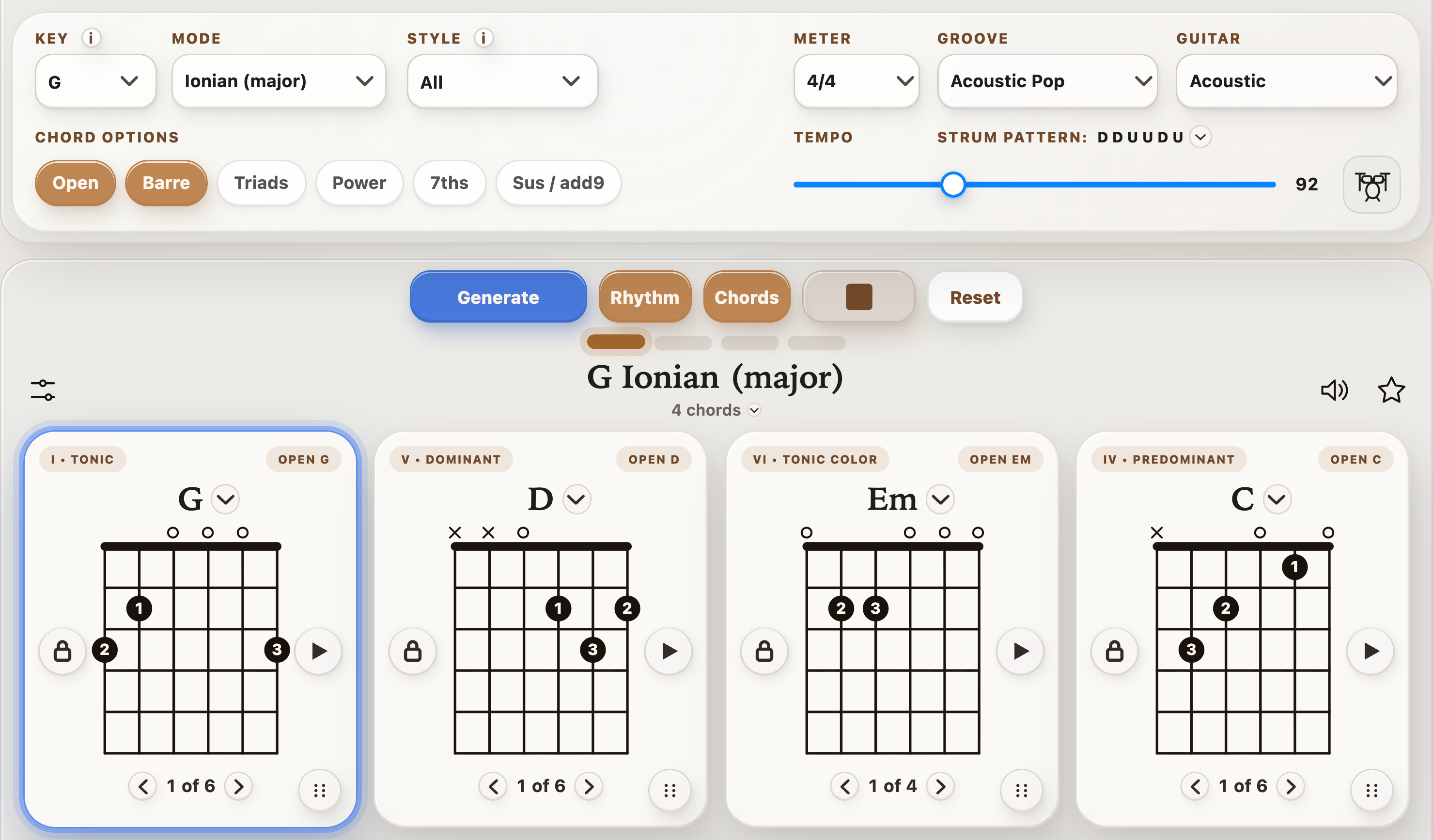
StrumForge playing G–D–Em–C with the drum-kit Rhythm button beside BPM
A repeating G–D–Em–C loop with the active chord highlighted. Open Rhythm to choose your backing groove.

02 · Play-along rhythm

Customizable drum accompaniment

Build a groove around the part you want to practice.

Tap the drum-kit button beside BPM to open Rhythm. Sampled drums follow the progression’s tempo and meter while you work on chord changes, strumming, or lead lines.

  • Set each kit part to Off, Light, Standard, or Busy.
  • Add fills every eight, four, or two bars and choose the guitar strum separately.
  • Balance Guitar and Drums volumes: lower the app’s guitar to play the chords yourself, or keep both parts for improvising.

Acoustic Pop, Waltz, and 6/8 Ballad are free with default kits and recommended strums. Additional sampled grooves, kit and fill edits, independent strum choices, and volume changes require Pro.

Explore drum practice
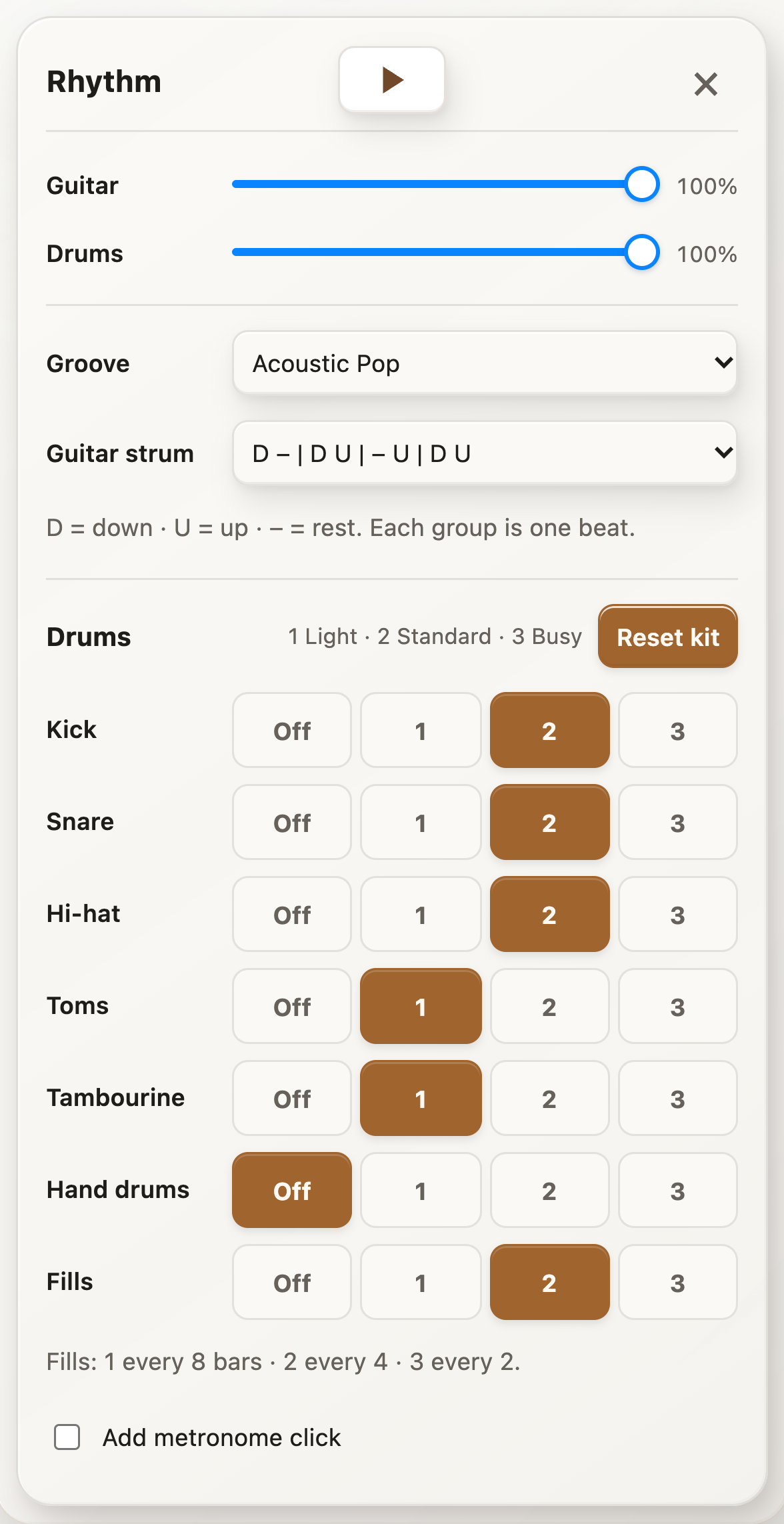
StrumForge Rhythm panel with per-part kit activity, fills, independent guitar strum, and Guitar and Drums volume controls
Open Rhythm with the drum-kit button beside BPM.

03 · Fretboard fluency

Guitar triad trainer

Find fresh voicings all over the neck.

Learn how three-note chords connect across the fretboard. Compare inversions to find smoother chord changes, tighter rhythm parts, and new places to play familiar harmony.

  • Explore major, minor, diminished, and augmented triads in any key.
  • Practice string sets 1–3, 2–4, 3–5, and 4–6 with inversion labels and a full-neck map.
  • Switch between note names and intervals; hear shapes strummed or arpeggiated at your tempo.

Free preview. Interactive controls and playback require StrumForge Pro.

Explore the triad trainer
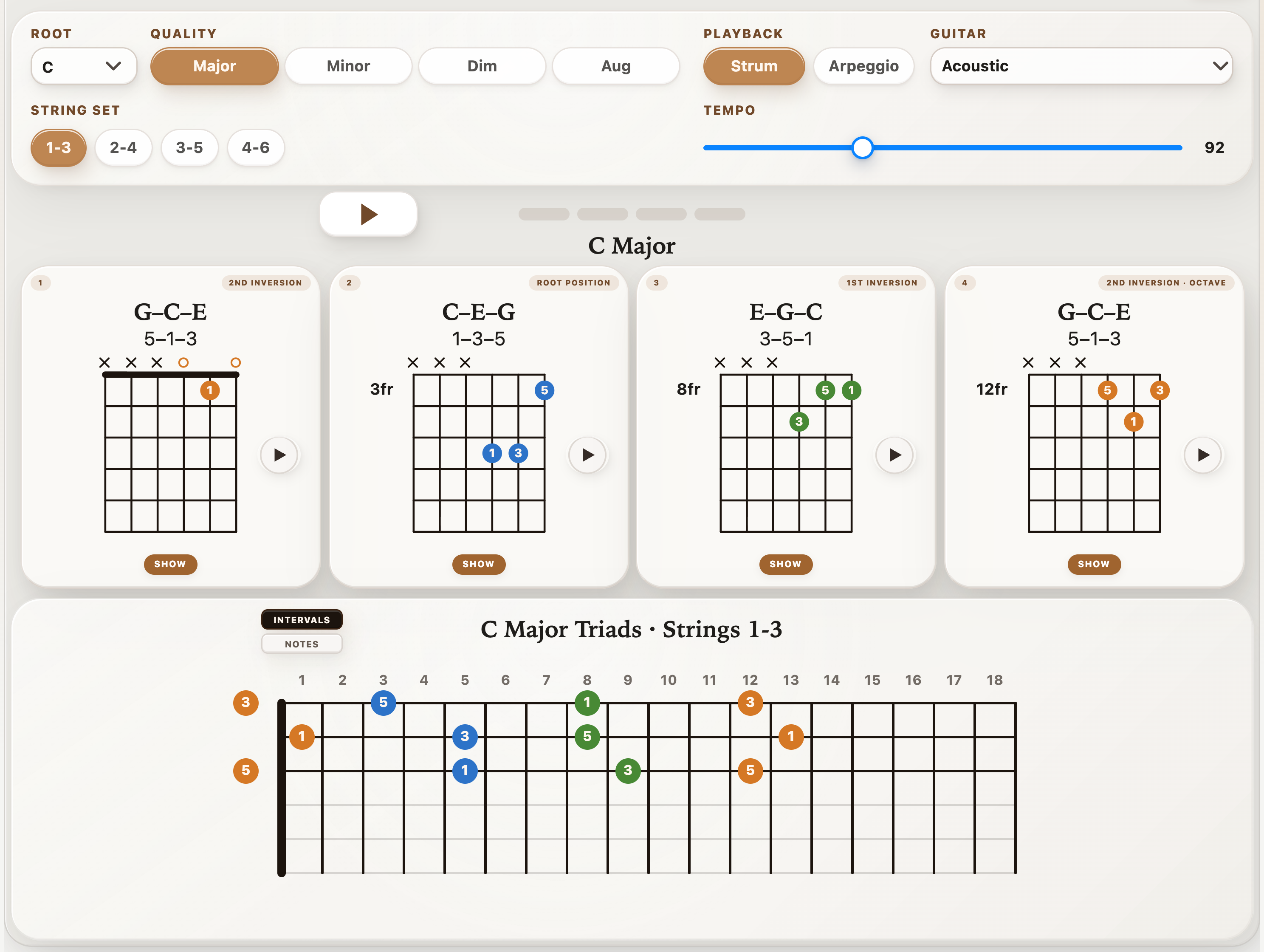
StrumForge Triad Trainer showing C major inversions on strings 1–3 and a connected fretboard map
C major inversions, with the same chord tones mapped across the neck.

04 · Chord tones & lead guitar

Guitar arpeggio trainer

Give your melodies somewhere to land.

Turn chord shapes into single-note lines. Follow movable CAGED patterns and hear each chord tone so your solos can follow the harmony with more intention.

  • Practice major, minor, major 7, minor 7, and dominant 7 arpeggios in C, A, G, E, and D shapes.
  • Choose interval, note, or finger labels, and tap a note to hear it. During playback, follow the same highlighted note on the fretboard and TAB.
  • Set direction, rhythm, and tempo; use a count-in, loop a shape, or cycle through keys.

Free preview. Interactive controls and playback require StrumForge Pro.

Explore the arpeggio trainer
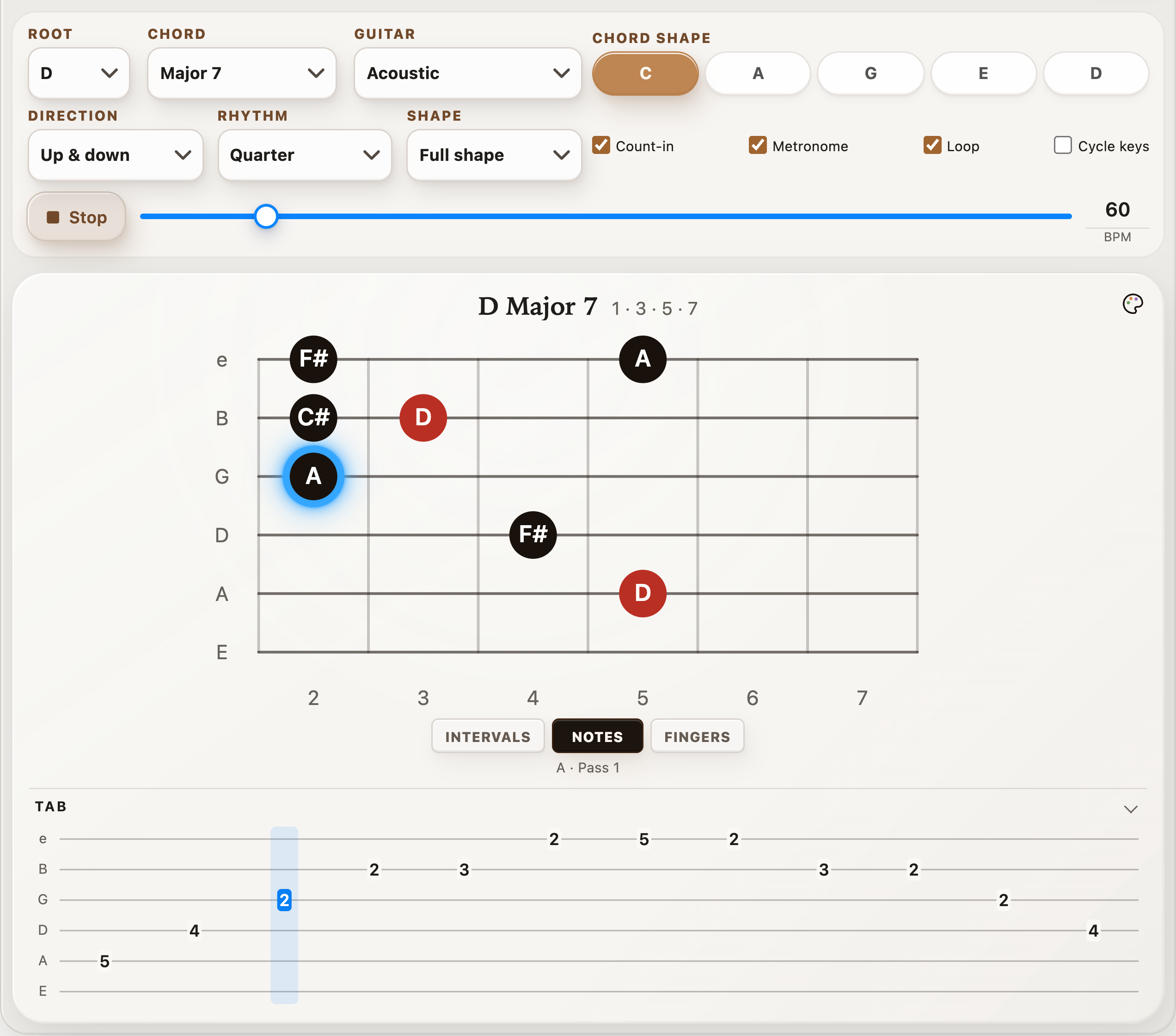
D major 7 CAGED arpeggio during playback with A highlighted on the fretboard and TAB
D major 7 in Notes view. The same note lights up on the fretboard and TAB during playback.

05 · Scales & improvisation

Interactive guitar scale tools

Connect the pattern to the progression.

Explore the notes around your chords, then practice them in time. Move between scale shapes and the chords in a key to build a clearer picture of how rhythm and lead fit together.
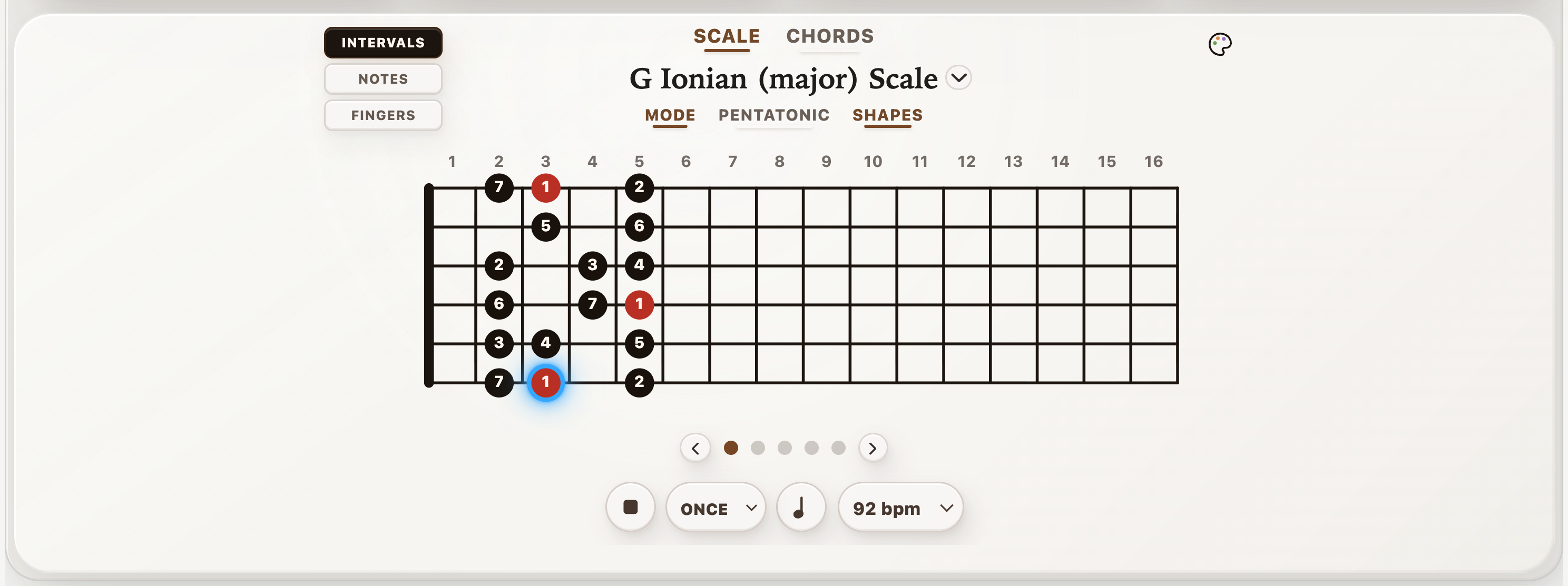
  • Explore modes, pentatonic and blues scales, and CAGED scale shapes.
  • Switch between intervals, note names, and fingerings; highlight chord tones on the fretboard.
  • Follow note-by-note playback, adjust BPM, repeat a shape, or practice through the positions.
Explore scale practice
StrumForge scale practice showing a G major shape with interval labels and an active playback note
G major scale practice with interval labels and the current note highlighted.

06 · Timing & control

Full-featured metronome

Build a stronger sense of time.

Set up the pulse your practice needs, from a slow chord-change drill to syncopated picking. Visual beat feedback helps you stay oriented while you listen and play.

  • Dial in BPM or tap your tempo. Choose time signatures, beat accents, subdivisions, and swing.
  • Use count-ins and a practice timer; gradually raise or lower BPM with the tempo trainer.
  • Test your internal pulse with silent-bar training, choose a click sound, and save your favorite setups.

Metronome controls and playback require StrumForge Pro.

Try it in StrumForge
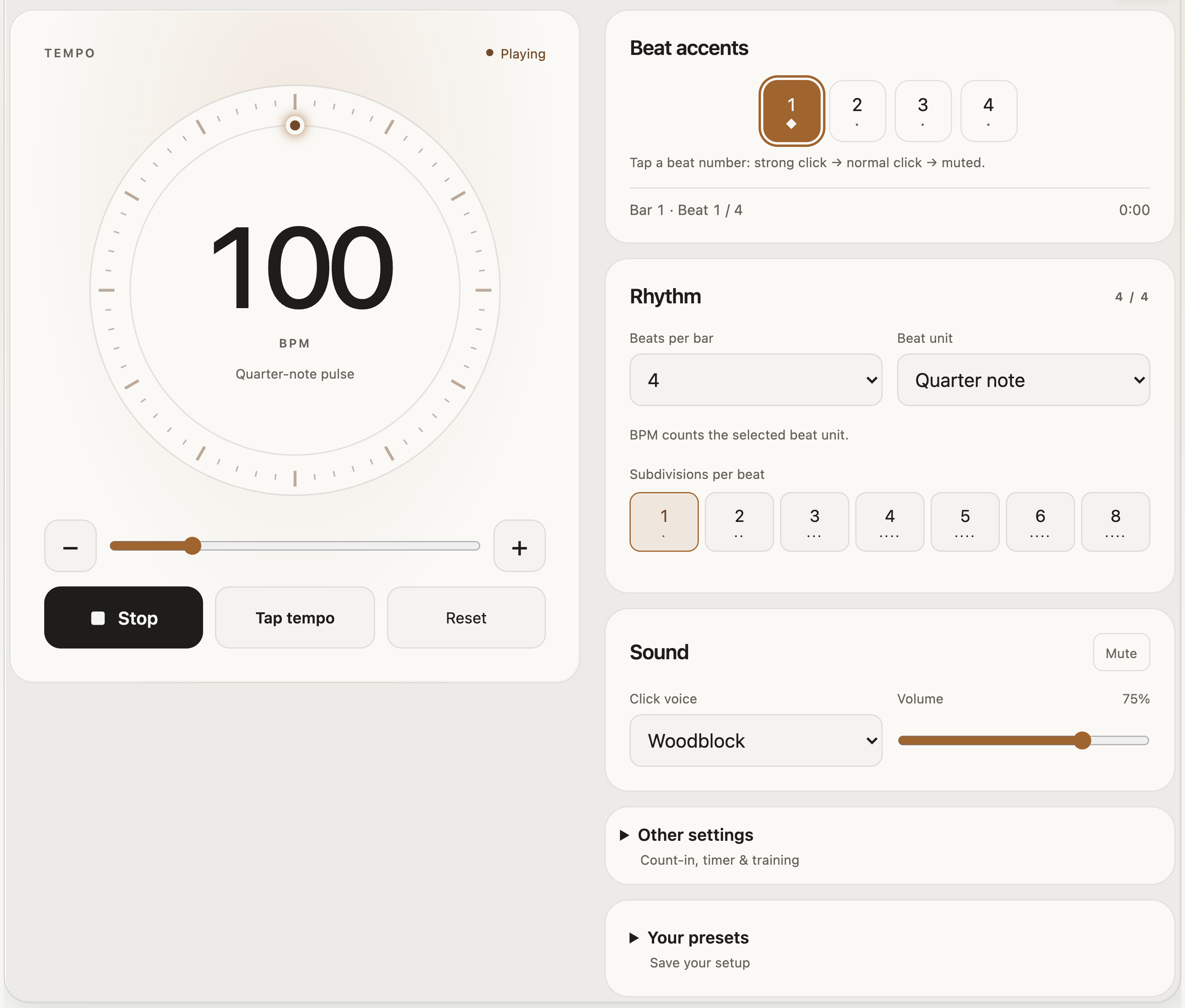
StrumForge metronome running at 100 BPM with visual beat accents, rhythm settings, and sound controls
A 100 BPM pulse with beat accents, subdivisions, sound, and practice settings.

07 · Tuning & new sounds

Guitar tuner & alternate tunings

Tune up. Try a different direction.

Get ready to play with a clear pitch display and built-in tuning presets. Explore the open strings and new textures of an alternate tuning before your next practice or writing session.

  • Use microphone detection with a cents display to see whether a string is sharp or flat.
  • Choose standard tuning, Drop D, Drop C, DADGAD, Open G, Open D, Open E, or half- and whole-step-down presets.
  • Auto-detect strings or select one to lock; hear reference tones and adjust the A4 reference pitch.

The built-in tuner requires StrumForge Pro. Microphone audio stays on your device.

Try it in StrumForge
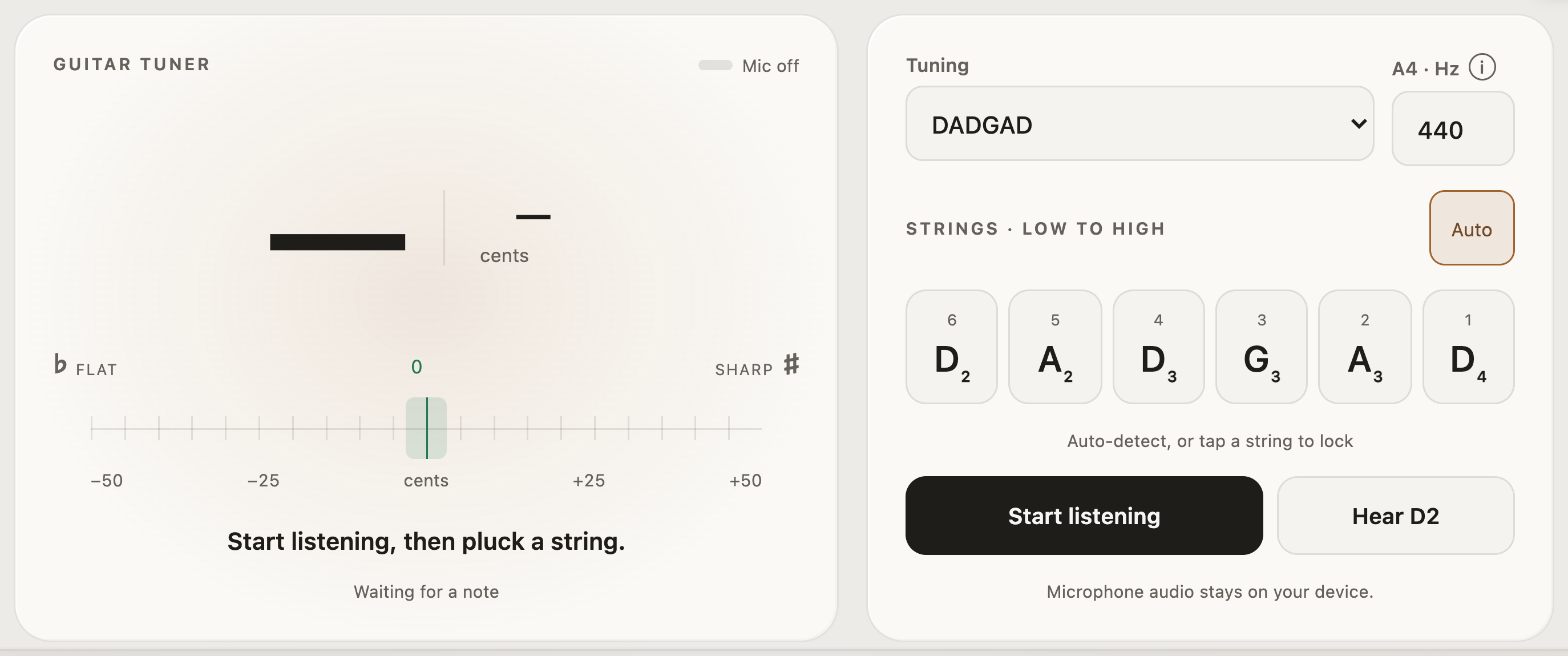
StrumForge guitar tuner set to DADGAD with six target string notes and a 440 Hz reference
The DADGAD preset and reference-tone controls, ready to start listening.

Your practice, connected

Keep the ideas that make you want to play.

Generate a progression, explore its chord tones, and work on the rhythm. StrumForge keeps the tools close so you can follow an idea from a first chord to a full practice session.

Make it yours

Choose voicings and guitar sounds, use left-handed diagrams, and open a wider fretboard view in landscape.

Pick up where you left off

With Pro, save favorites, organize ideas into folders, share progressions, and sync across devices.

Start free. Go further with Pro.

Try progression generation and explore trainer previews. Pro unlocks interactive trainers, tuner, metronome, unlimited generation, and longer progressions.