Backing chords: D – G – A – D
Listen to the four chords, then try your target notes over them. B is the third of G; C♯ is the third of A.


Fretboard practice · StrumForge
Learn the chord tones.
Put them into your solos.
Practice major, minor, and seventh-chord arpeggios across five CAGED shapes. See the notes, intervals, or suggested fingering alongside TAB. During playback, the current note lights up on both the fretboard and TAB so you can follow the pattern at your own pace.
Free preview. Playback and interactive controls require StrumForge Pro.
Web · iPhone · iPad · Android
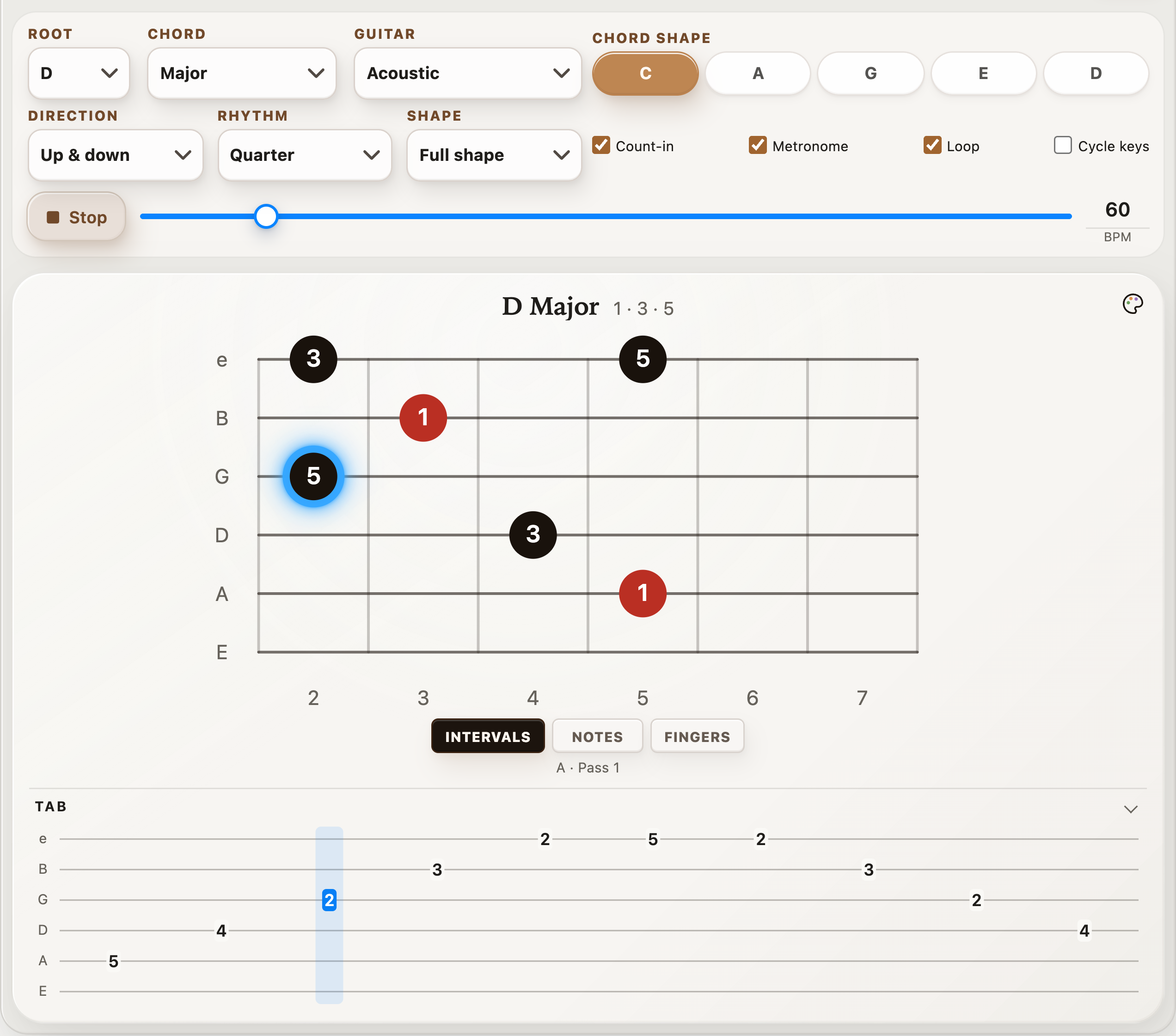
Choose any of the 12 roots and a major, minor, major 7, minor 7, or dominant 7 chord. Switch between note names, intervals, and suggested fingering.
Explore the C, A, G, E, and D shapes. Start with One Octave, then switch to Full Shape to play the rest of the pattern.
With Pro, slow the playback down, add a count-in, and loop the pattern. Practice going up, coming down, or both, following the matching highlights on the fretboard and TAB.
Here’s one example to get you started. We’ll use D major, but the trainer lets you choose any of the 12 roots.
An arpeggio is a chord played one note at a time. For D major, those notes are D, F♯, and A: the root, third, and fifth.
This example uses the C shape from the CAGED system. That describes the fingering pattern; the chord you’re playing is still D major.
e|-----------------------|
B|-----------3-----------|
G|--------2-----2--------|
D|-----4-----------4-----|
A|--5-----------------5--|
E|-----------------------|
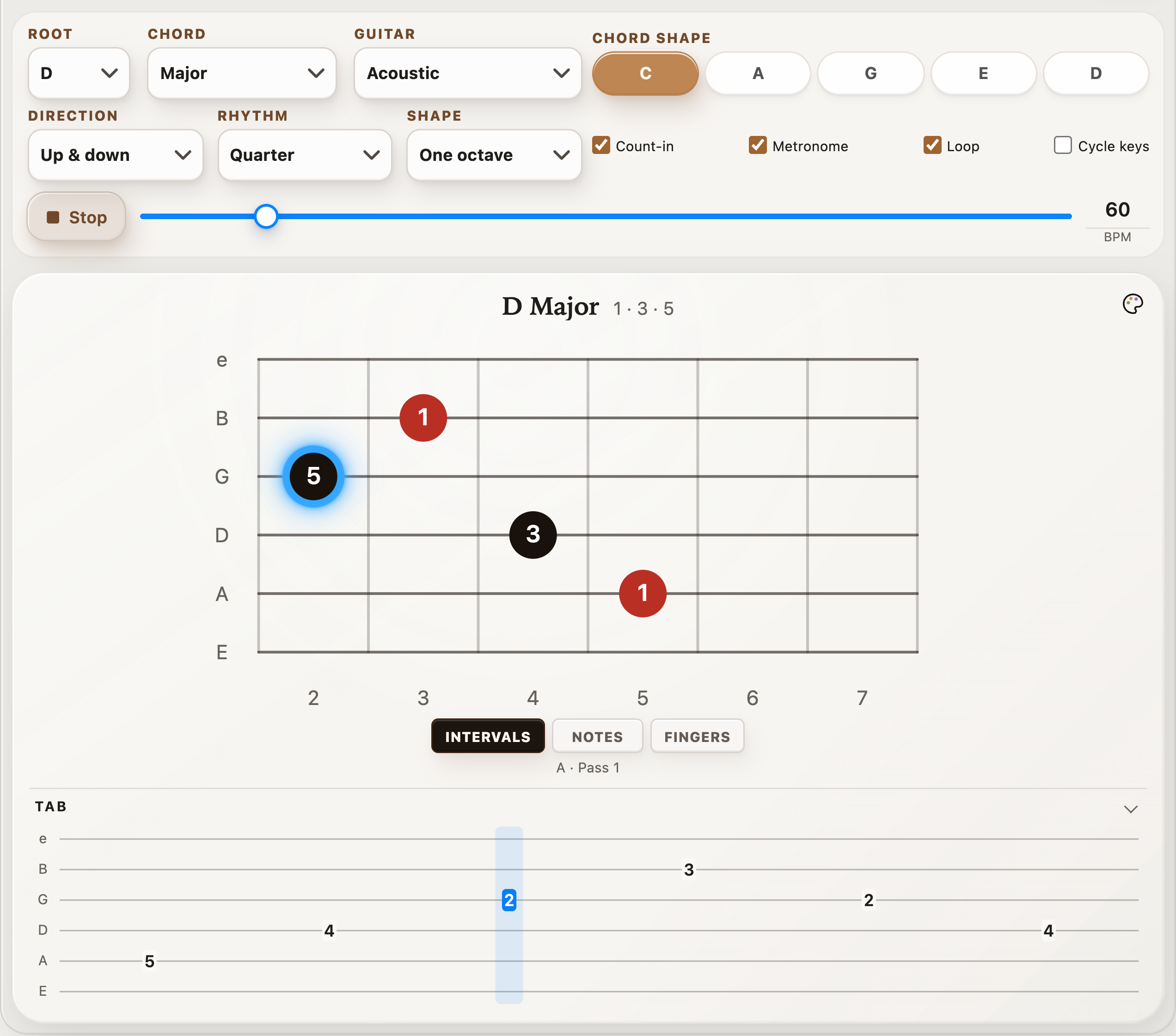
In standard tuning, start on the A string at fret 5. Play one note at a time and keep the unused strings quiet. Listen for how the phrase comes home when you return to D.
Once that feels comfortable, switch to Full shape to extend the climb: after the B string at fret 3, play frets 2 and 5 on the high E string, then come back down.
Free preview. Playback and interactive controls require StrumForge Pro.
Grab your guitar and try this short routine. Use the trainer’s playback with Pro, or play the TAB above with your own metronome.
The tempo range is 40–200 BPM, with quarter notes, eighth notes, triplets, and sixteenth notes. At 60 BPM, eighth notes give you two notes per beat. With Loop and Cycle keys enabled, the root moves up a fourth every four passes.
Start slowly and increase the tempo when every note sounds clean.
Chord tones give your phrases somewhere to land. Play the backing chords below and aim for D over D, B over G, C♯ over A, then D again. Play each target note as its chord begins.
Once you can follow the changes, add one or two notes before each target. Leave a little space between phrases so you can hear the chord change.
Listen to the four chords, then try your target notes over them. B is the third of G; C♯ is the third of A.
The Arpeggio Trainer plays single-note exercises. For a repeating chord backing, open these chords in the progression generator. In the app, tap the drum-kit button beside BPM to choose a backing groove. With Pro, simplify the kit, turn fills Off, and lower Guitar volume to play your own chord tones over the drums. Progression playback is separate from the trainer; it does not move the trainer through the backing chords automatically. You can also use scale notes to connect your chord tones.
Keep D as the root and compare the notes below. Major and minor arpeggios have three chord tones; seventh-chord arpeggios add a fourth.
| Arpeggio | Formula | Notes in D |
|---|---|---|
| Major | 1–3–5 | D–F♯–A |
| Minor | 1–♭3–5 | D–F–A |
| Major 7 | 1–3–5–7 | D–F♯–A–C♯ |
| Minor 7 | 1–♭3–5–♭7 | D–F–A–C |
| Dominant 7 | 1–3–5–♭7 | D–F♯–A–C |
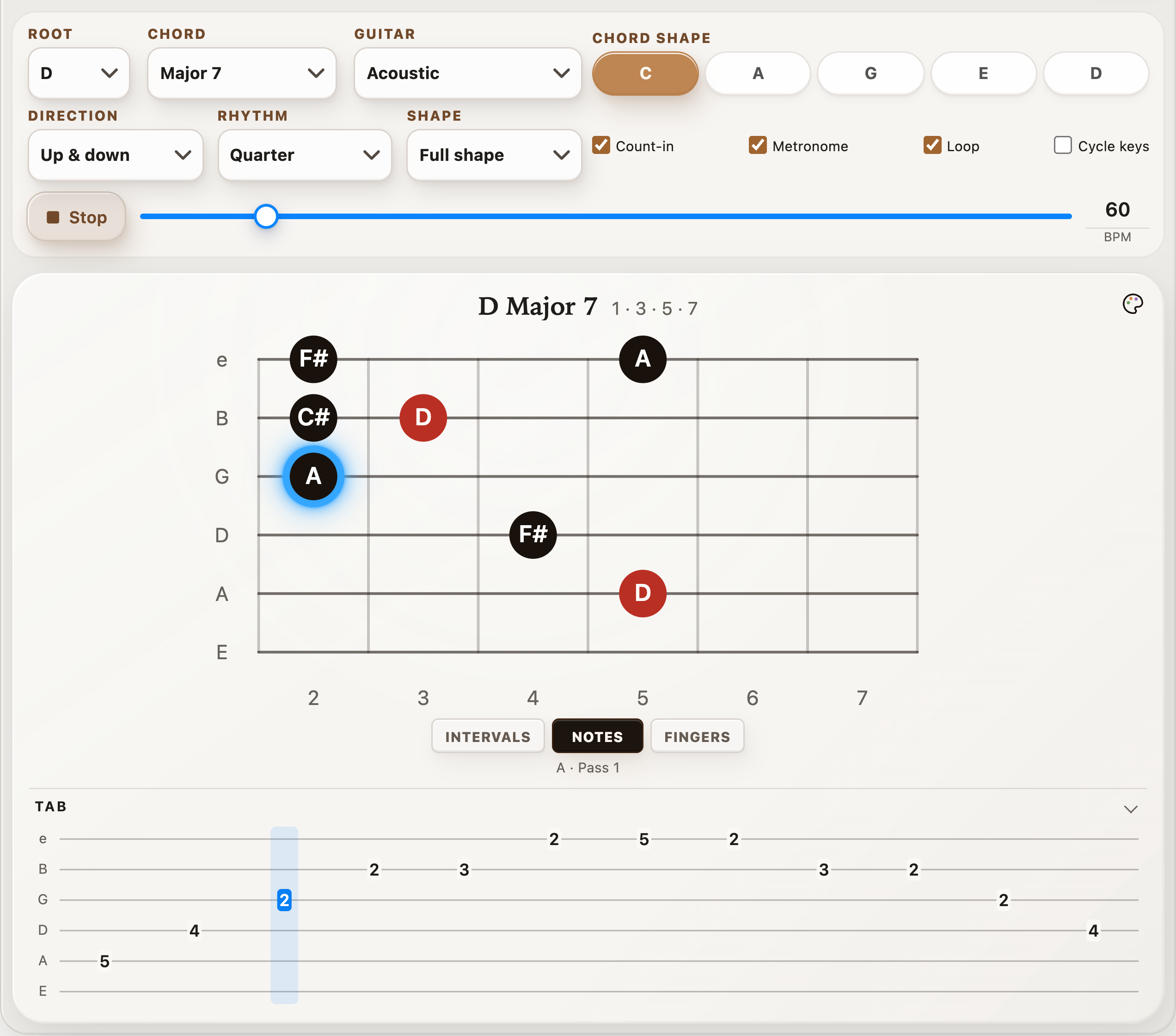
With Pro, compare D major and D major 7 in the same CAGED shape. D major 7 adds C♯. Switch to Notes to see where it fits.
Then try D7: its seventh is C natural, one fret below C♯. Listen to how that one note changes the sound.
No. Start with the D major example above and learn one position. CAGED names five shape families based on the open C, A, G, E, and D chords. Each gives you another place to play the same chord tones on the neck.
When one shape feels familiar, find a D in the next shape and connect the two through that note.
A triad is a three-note chord. An arpeggio is a way of playing chord tones separately, whether the chord has three notes or more. Use the Triad Trainer for compact chord shapes and inversions, and the Arpeggio Trainer for single-note patterns across CAGED positions.
You can view the trainer preview for free. Playback and interactive controls require StrumForge Pro. The TAB and lesson on this page are free to use with your guitar.
Yes. The trainer is part of the StrumForge guitar practice app, available on web, iPhone, iPad, and Android. Your trainer settings are saved on the device you’re using.
Start with one arpeggio and a comfortable tempo. Learn how it sounds, then find another place to play it.
Free preview. Playback and interactive controls require StrumForge Pro.
Use D at A-string fret 5, F♯ at D-string fret 4, A at G-string fret 2, and D at B-string fret 3. Play those four notes once per beat, then repeat them as two eighth notes, two quarter notes, and a quarter rest. Keep the tempo fixed and listen to the space at the end.
Next, insert C♯ at B-string fret 2 before the upper D. That adds the major seventh for Dmaj7. Use C natural at fret 1 instead to hear D7. Say the seventh before playing it so the two sounds stay distinct.
Get the TAB and full routine in five CAGED arpeggio exercises. To apply the notes over changing harmony, continue with chord-tone soloing.