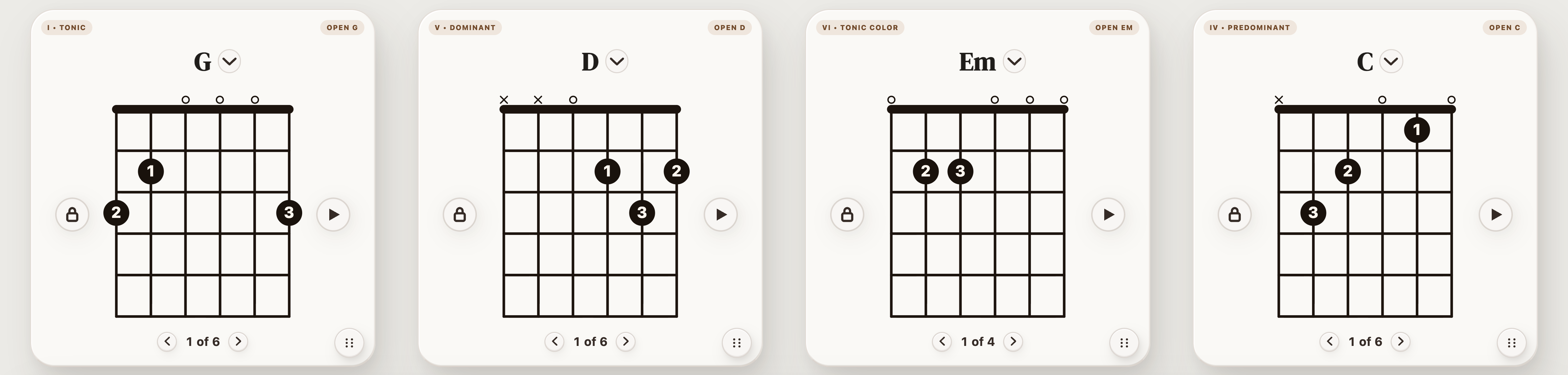
Four familiar open chords: G – D – Em – C
Play one chord per bar. Find the change that makes you hesitate; use that pair for the routine below.


Guitar lessons · Updated September 10, 2026
Practice the slowest pair of chords before repeating the whole song. Start at a tempo where both chords ring clearly, change on a predictable beat, and count clean changes rather than every attempt. This ten-minute routine turns that idea into a repeatable session.
Play one chord per bar. Find the change that makes you hesitate; use that pair for the routine below.
| Time | Task | A useful check |
|---|---|---|
| 0–2 minutes | Fret each chord and pick its strings individually. | Clear fretted notes; unused strings stay quiet. |
| 2–5 minutes | Alternate only the hardest pair, with one change every four beats. | Every first beat arrives without a pause. |
| 5–7 minutes | Keep the pair; change every two beats at the same tempo. | Do not trade clear notes for extra repetitions. |
| 7–10 minutes | Return to G–D–Em–C, one bar per chord. | Keep strumming through the loop’s return from C to G. |
Try 60 BPM as a starting point and slow it down if you cannot arrive cleanly. After three steady loops, increase by a small step such as 5 BPM. If two changes in a row miss the beat, return to the previous tempo.
Write down the chord pair, tempo, beats per chord, and number of clean changes in one minute. Compare sessions only when those conditions match. A slower session with quieter fingers and cleaner notes can be progress even if the raw count falls.
If your hand freezes while moving, use the finger-movement drills. If the shapes are still unfamiliar, start with easier chord pairs.
| What happens | What to try |
|---|---|
| One string buzzes after landing | Stop the clock, pick each string, and adjust that finger before repeating. |
| The whole hand jumps away | Release pressure while keeping the fingertips close to the strings. |
| The fretting hand catches up but the rhythm stops | Use one light downstroke per bar and keep the counting continuous. |
| The first three changes work but the loop breaks | Practice C–G on its own; the last-to-first change is part of the progression. |