

Name notes out loud
Choose one string or one fret and name every note before you play it. Accuracy matters more than speed.
Guitar practice
Practice fretboard visualization with note-name drills, octave shapes, triads, chord tones, position shifts, and scale targets that connect the neck.
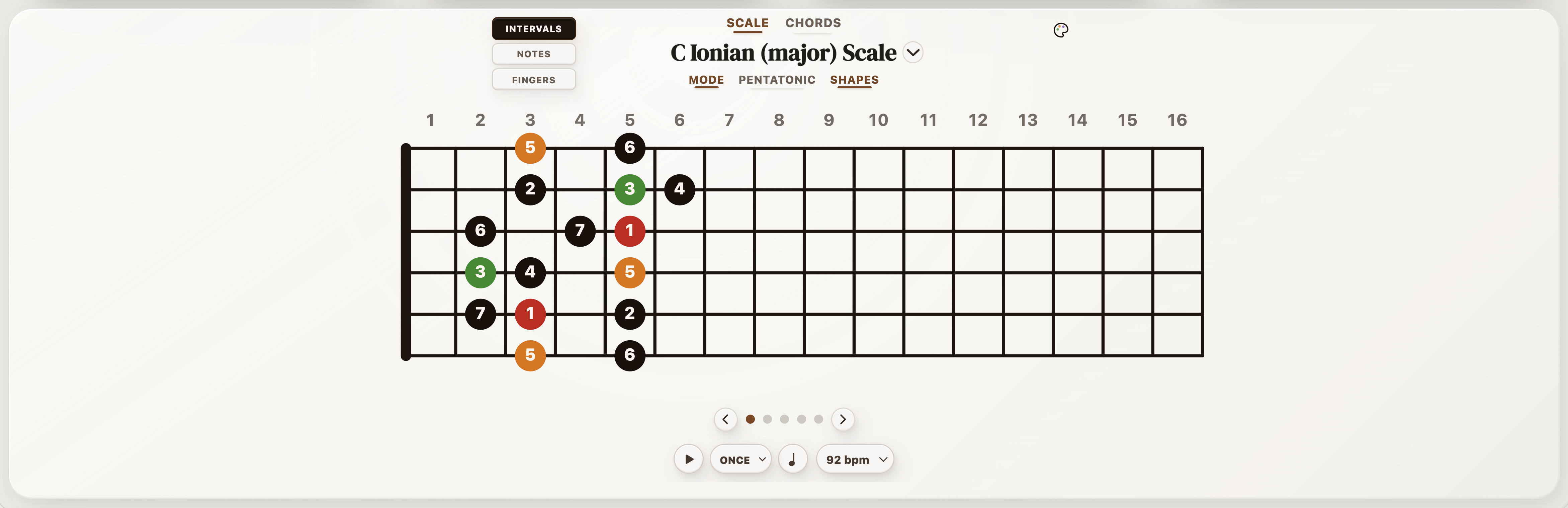
These drills are about finding notes and relationships on the neck. Use a backing loop only after the map is clear.
Fretboard visualization is about connecting notes, intervals, chord tones, and positions instead of memorizing isolated boxes.
Choose one string or one fret and name every note before you play it. Accuracy matters more than speed.
Find the same note in three places. Octaves make the neck feel connected instead of linear.
Pick a chord and find its root, third, and fifth in one position before adding scale notes around it.
Move a phrase to a new string set or position while keeping the same note names or interval pattern.
| When you need... | What to do on guitar |
|---|---|
| To get the idea under your hands | Play one fretboard visualization for guitar example slowly with a single voicing family before changing anything else. |
| To make the part cleaner | Fix the weakest chord change or rhythm accent first, then return to the full progression. |
| To make it your own | Change one variable at a time: key, capo position, rhythm, register, chord color, or scale focus. |
| To test it in StrumForge | Open a related loop when you want diagrams, groove playback, and timing practice. |
Use the page as a starting point, then move into the app when you need sound, timing, diagrams, and scale context.
Short answers for players using this page as a practice or writing reference.
Start with note names and octave shapes, then connect those notes to triads and chord tones in one position.
Yes. Each linked example opens a four-chord progression in the generator and counts toward the current 5 free daily progression generations.
Yes. Once the loop works, change key or capo position so the idea becomes a fretboard exercise instead of a memorized shape.