

Practice loops
Repeat a progression until the chord changes are clean and the strumming hand stays steady.
Guitar workflow
StrumForge keeps the sound and the shape together: generate a progression, hear the groove, follow the active chord, and adjust the voicing without leaving the page.
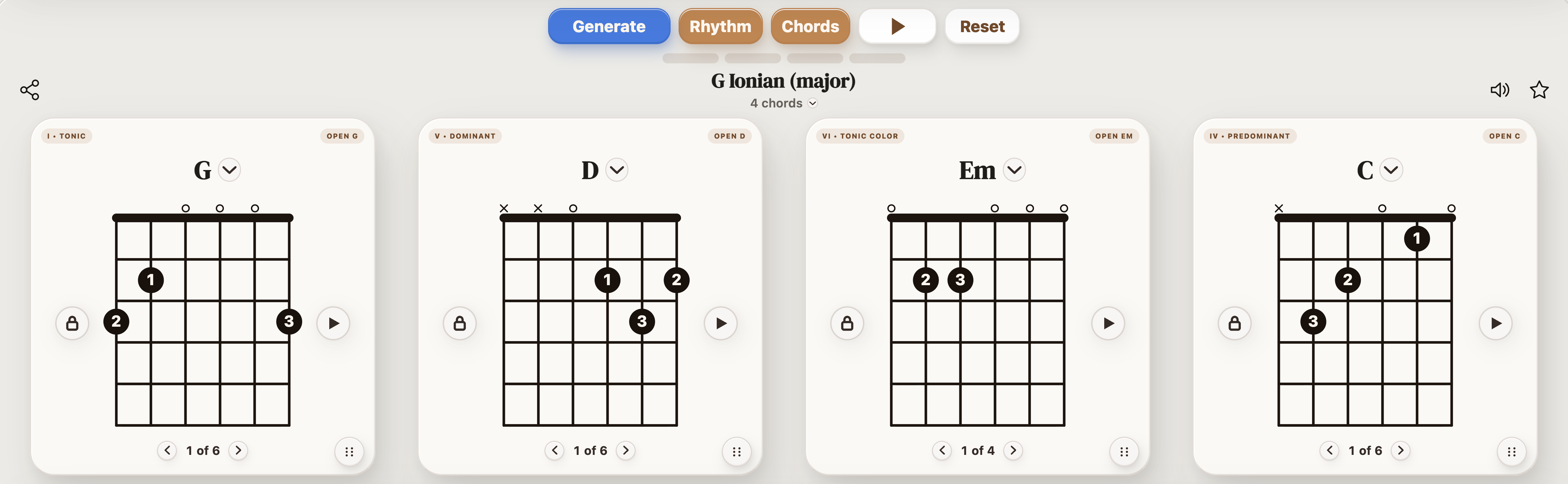
StrumForge is a strong fit if you want a guitar app with both chord diagrams and playback. It is designed for players who want to generate progressions, hear the loop, see playable shapes, switch voicings, and use scale context for writing or improvisation.
The best workflow connects the musical result to the physical guitar shape.
| Need | Why it matters |
|---|---|
| Chord diagrams beside the progression | You can judge the loop as something to play, not just as chord names. |
| Playback with tempo control | You can test the timing and slow down the hard part without losing the musical context. |
| Voicing options | You can choose open shapes, barre shapes, triads, or other practical versions of the same harmony. |
| Scale context | You can move from rhythm guitar into lead ideas or improvisation without opening a separate theory reference. |
Use it when the next step is playing, not filing away another chord chart.
Repeat a progression until the chord changes are clean and the strumming hand stays steady.
Generate a loop, keep the part that works, and change one weak chord instead of restarting the whole idea.
Use the progression as a backing loop and keep the scale view nearby for chord-tone targeting.
Give a student a concrete loop with diagrams, sound, and a manageable transition to practice.
Use the Triad Trainer to learn major, minor, diminished, and augmented triads across four string sets. Use the Arpeggio Trainer for CAGED major, minor, major 7, minor 7, and dominant 7 patterns, with interval, note, or finger labels and timed playback. Both offer a free preview; interactive controls and playback require Pro.