Back to StrumForge
Get it on Google Play Download on the App Store

Four-chord discovery and refinement

Random Guitar Chord Progression Generator

Generate a four-chord guitar progression when you want a new starting point instead of another progression you already know.

StrumForge adds variation inside a musical framework, then gives you guitar diagrams, playback, voicing controls, and scale context so you can actually do something with the result.

The useful part is not simply getting four new chord names. It is hearing the loop, playing it on guitar, keeping the parts that work, and changing the parts that do not.

  • Generate a new four-chord guitar progression
  • Hear the progression as a repeating loop
  • Follow playable guitar chord diagrams
  • Lock the chords you want to keep
  • Replace, reorder, or revoice individual chords
  • Use scale diagrams for riffs, melodies, and improvisation
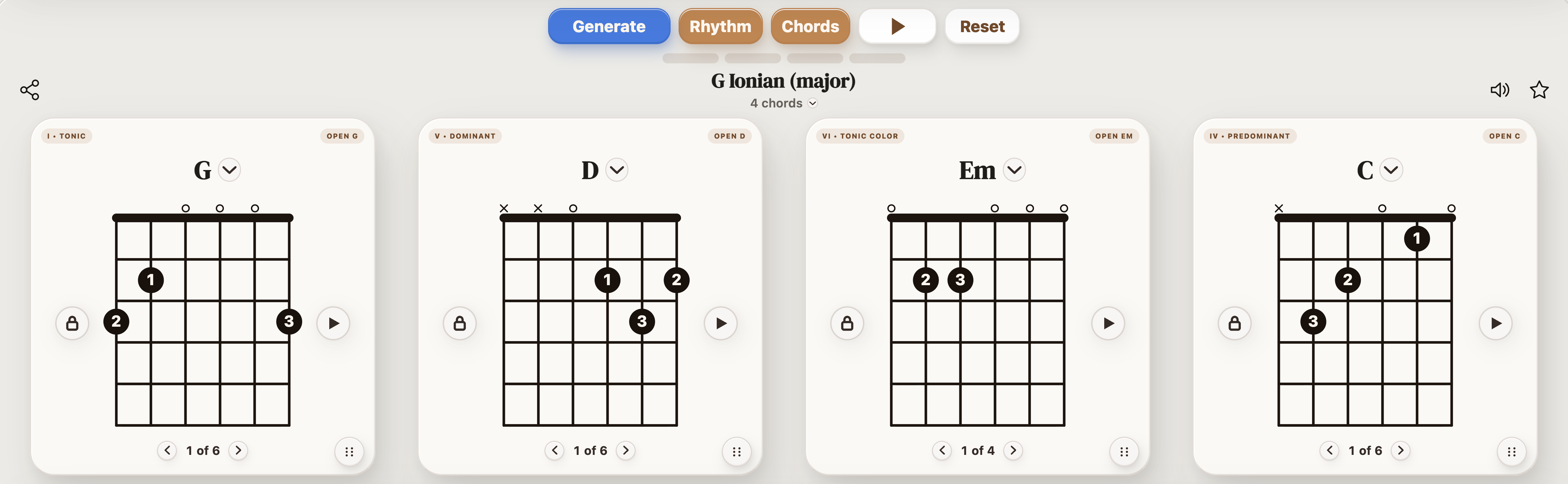
StrumForge random guitar chord progression generator showing four chord diagrams and playback controls
Generate the idea first, then turn the random result into something you actually want to keep playing.

Generate a random progression, not just four random chords

There is an important difference between generating random chord names and generating a progression.

Four completely unrelated chords can certainly produce an interesting surprise, but they can also give you a sequence with no useful tonal center, awkward movement, or little connection between the chords.

StrumForge uses the active key, mode, style, and chord settings to shape the range of possible results. You can leave those controls broad when you want more surprise or narrow them when you already know part of what you are looking for.

The result is still unpredictable, but you have control over what kind of unpredictability you want.

Generate a random guitar progression

How random do you want the progression to be?

Random does not have to mean giving up all control. Use the generator differently depending on how much direction you already have.

If you want...Start with...
The broadest possible starting pointKey: All, Mode: Auto, Style: All
A progression in a specific keyChoose the key and leave the other harmonic controls broader
A particular harmonic colorChoose a key and mode
Easy chord-change practiceUse a guitar-friendly key and Open chords
Movable shapesEnable Barre chords or Triads
A riff starting pointEnable Power chords
More harmonic colorEnable 7ths and Sus / add9
A progression for improvisingChoose a key/mode so the related scale view has a clear context

The more controls you specify, the narrower the possible results become.

Neither approach is better. Use fewer restrictions when you need an idea and more restrictions when you already know what kind of part you are trying to write or practice.

How to use the random guitar chord progression generator

  1. Start broader than you normally would

    If the point of the session is to discover something unexpected, resist the urge to choose every setting first.

    Leave the key, mode, or style broad enough that StrumForge can give you something you probably would not have chosen manually.

    If the result is too far from what you need, add one restriction rather than controlling everything at once.

  2. Listen before judging the chord names

    A progression on paper does not tell you how it will feel as a loop.

    Play the generated progression and listen through several repetitions before replacing anything.

    Pay attention to:

    • where the progression feels settled
    • which change creates the most tension
    • whether the fourth chord leads naturally back to the first
    • whether one chord feels like the interesting surprise
    • whether the rhythm changes your impression of the harmony

    A progression that looks strange as four chord names can make much more sense once it is moving in time.

  3. Play the chord changes yourself

    Follow the guitar diagrams and find out whether the progression works physically on the instrument.

    Sometimes the harmony is good but one transition feels awkward.

    That does not necessarily mean the chord needs to change. Try another available voicing first.

    A progression can feel dramatically different when you move from large open or barre shapes to smaller triads, or when two consecutive chords are voiced closer together on the fretboard.

  4. Lock the strongest chord or movement

    You do not have to either accept or reject the whole progression.

    If one part catches your attention, keep it.

    That might be:

    • the first chord
    • an unexpected second chord
    • the movement between chords two and three
    • the final chord leading back to the beginning

    Lock the positions you want to preserve, then generate another variation around them.

    This turns random generation into an editing process instead of a slot machine.

  5. Fix one weak chord instead of starting over

    If three chords work and one does not, replace the weak chord.

    Suppose the generated progression is:

    G – Bm – C – Am

    and you like the first three positions—G, Bm, and C—but Am makes the loop lose momentum.

    Keep the first three positions and test another fourth chord rather than throwing away the entire idea.

    Try:

    G – Bm – C – D

    Now the final D creates a stronger push back toward G.

    Neither version is automatically better. The important point is that you can identify exactly what is not working and change that part.

Five ways to rescue an almost-good random progression

A random progression does not need to be perfect on the first generation. Often the interesting result is one adjustment away from becoming useful.

1. Change the fourth chord

The final position has a large effect on how the progression loops.

If the first three chords work but the return feels weak, experiment with the fourth chord before changing anything else.

A stronger dominant movement can make the loop feel more resolved. A less conventional final chord can do the opposite and keep it open-ended.

2. Reorder the same four chords

You may already have the right harmony in the wrong order.

For example:

G – C – Em – D

and:

Em – C – G – D

use the same basic chord family but create different first impressions.

The first establishes G immediately.

The second begins from the relative minor and feels darker before reaching G later in the loop.

Use StrumForge's chord ordering controls to test the same harmonic material from another starting point.

3. Try another voicing

Before replacing a chord, change where you play it.

The same harmony can feel different when you switch between:

  • open shapes
  • barre shapes
  • triads
  • alternate available voicings

Voicing changes can create smoother transitions, different top-note melodies, and a completely different guitar register without changing the progression itself.

4. Change the rhythm

A progression that feels uninteresting with one strum per bar may work with:

  • steady eighth notes
  • arpeggios
  • palm-muted picking
  • syncopated accents
  • long sustained chords
  • a different groove or tempo

Chord names describe the harmony, not the complete guitar part.

Test the rhythm before deciding the progression has failed.

5. Add chord color selectively

If the basic progression works but feels too plain, try a supported seventh, suspended, or add9 variation where appropriate.

Do not automatically extend all four chords.

Changing one chord can be enough.

For example:

G – D – Em – C

could become:

G – Dsus2 – Em7 – Cadd9

The underlying movement remains recognizable while the voicings introduce more color and shared notes.

A better random-progression workflow

Do not measure a random generator by how quickly you can press Generate.

  1. GenerateCreate one progression.
  2. ListenLet it loop several times.
  3. PlayFollow the diagrams and test the changes on guitar.
  4. Identify the hookFind the chord, transition, rhythm, or sound that made you stop and listen.
  5. Lock itPreserve that part.
  6. ReviseReplace, reorder, or revoice whatever is weaker.
  7. Play againJudge the revised progression as a complete loop.
  8. Develop itUse the result for rhythm practice, a riff, a melody, improvisation, or the start of a song section.

The goal is not to find a mathematically perfect progression. It is to find one musical idea worth developing.

Four useful random-generator setups

Completely open songwriting prompt

Use this when you have no starting idea.

Key: All
Mode: Auto
Style: All
Chord options: Several supported families
Tempo: Whatever feels comfortable

Generate once and listen.

Do not immediately regenerate because the progression is unfamiliar. Give yourself a few repetitions to hear what it is doing.

Open-chord writing session

Use this when you want something easy to pick up and play immediately.

Key: C, G, D, A, or E
Mode: Auto or Ionian
Chord options: Open
Tempo: Start around a comfortable moderate speed

The narrower setup still gives you a new progression while keeping the physical guitar shapes familiar.

Power-chord riff prompt

Use this when the rhythm and root movement matter more than full major/minor harmony.

Key: All or a chosen tonal center
Mode: Auto
Chord options: Power

Treat the generated four roots as raw material.

  • palm muting
  • rests
  • repeated eighth notes
  • syncopated attacks
  • slides between shapes
  • repeating one chord for part of the measure

The progression provides the movement. Your rhythm turns it into the riff.

Extended-chord color

Use this when ordinary major and minor shapes are not giving you anything new.

Enable supported seventh and Sus / add9 options.

Listen for a single chord that changes the mood of the progression rather than assuming every position needs an extension.

Once you find an interesting color chord, lock it and generate another variation around it.

Example: turn one random result into four different ideas

Suppose the generator gives you:

D – A – Bm – G

Instead of immediately generating another progression, use the same four chords four ways.

Version 1: straightforward rhythm guitar

Play full chords with steady eighth-note strumming.

This establishes what the progression sounds like in its simplest form.

Version 2: quieter verse

Keep the chords identical but use light arpeggios or smaller voicings.

The harmony has not changed, but the register and density have.

Version 3: more color

Try:

D – Asus4 – Bm7 – Gadd9

The harmonic movement is still based on the same four positions, but the extensions and suspended note change the texture.

Version 4: rearrange the loop

Try:

Bm – G – D – A

Now the progression begins on the relative minor rather than D.

The same chord family produces a noticeably different first impression simply because the starting point changed.

This is why generating the chords should be the beginning of the process rather than the end.

Use random progressions for guitar practice

A random progression is also useful when you want to practice chord changes without repeatedly choosing familiar combinations.

Open-chord practice

Limit the generator to Open chords and slow the playback down.

Follow the diagrams until all four transitions are clean.

Barre-chord practice

Enable Barre chords and concentrate on releasing excess fretting-hand pressure between changes.

Triad practice

Use smaller triad voicings to play the same progression in another area of the neck.

Pay attention to how the highest note changes between shapes.

Power-chord practice

Generate root movement you would not normally choose yourself and move the same power-chord shape around the neck.

Rhythm practice

Leave the progression unchanged and cycle through different rhythms.

This isolates your picking-hand work because the harmonic material stays constant.

Use a generated progression for melody and improvisation

Once you have a progression worth keeping, stop generating and start playing over it.

When you have selected a key and mode, use the related scale diagrams as fretboard context.

Start simply:

  1. Let the progression loop.
  2. Choose only a few scale notes.
  3. Repeat a short melodic motif.
  4. Listen to how the same note feels over each chord.
  5. Adjust the phrase when the harmony changes.
  6. Gradually expand into another fretboard position.

The scale diagram gives you a set of available notes. Your ear still determines which notes sound settled or tense over each chord.

Random does not mean you have to keep the result

The purpose of randomness is to interrupt your habits.

If you normally reach for G–D–Em–C every time you pick up the guitar, a generator can force you to begin somewhere else.

But the generated progression is not an instruction.

You can:

  • keep all four chords
  • keep only two
  • change one chord
  • reorder all four
  • use only the root movement
  • copy the rhythm but replace the harmony
  • use the progression only as an improvisation backing loop

The useful result is whatever gives you something you would not have reached as quickly on your own.

Generate a progression

Random Guitar Chord Progression Generator FAQ

What is a random guitar chord progression generator?

It is a tool for creating a new sequence of guitar chords when you want a starting point for playing, practice, songwriting, or improvisation. StrumForge generates four chord positions and pairs them with guitar diagrams and playback so you can immediately hear and play the result.

Does StrumForge choose four completely unrelated chords?

No. StrumForge introduces variation within its progression system. The active key, mode, style, and chord settings influence the possible results rather than simply drawing four unrelated chord names from a list. Leaving the controls broad produces more variety. Selecting a key, mode, style, or chord family narrows the result.

How many chords are in a generated progression?

StrumForge uses four chord positions per progression. You can replace individual chords, lock positions you want to preserve, change the order, or try other supported voicings.

Can I generate a progression in a specific key?

Yes. Select a key when you want a defined tonal center, or leave the key open when you want a broader starting point.

Can I generate random power-chord progressions?

Yes. Enable the Power chord option when you want the result represented with root-and-fifth power-chord shapes. This works well when you want a starting point for riffs or heavier rhythm guitar parts.

Can I generate progressions with seventh, sus, or add9 chords?

Yes. StrumForge includes supported seventh and Sus / add9 options in addition to its basic chord-shape families. Use them selectively when you want more harmonic color.

Can I keep a chord I like and randomize the rest?

Yes. Lock the chord positions you want to preserve and generate another variation around them. This is useful when only part of a generated progression catches your attention.

Can I manually change one generated chord?

Yes. Individual chord positions can be replaced without rebuilding the entire progression. Try changing only the weakest chord before discarding an otherwise useful result.

Can I reorder a generated progression?

Yes. The four chord cards can be reordered so you can test a different starting point or cadence while keeping the same harmonic material.

Can I hear the random progression?

Yes. Use the playback controls to hear the progression as a repeating loop with the available guitar, rhythm, tempo, groove, and meter controls.

Does StrumForge show guitar chord diagrams?

Yes. The generated chords are paired with supported guitar diagrams, and other available voicings can be explored where supported.

Can beginners use the random progression generator?

Yes. For an easier starting point, choose a guitar-friendly key, enable Open chords, and reduce the tempo. Once the transitions are comfortable, broaden the settings or introduce movable and extended chord types.

Can I use a random progression for songwriting?

Yes. Treat the generated progression as a starting point rather than a finished song. Loop it while testing a vocal melody, guitar riff, rhythmic motif, or different arrangement. Keep the parts that work and change the ones that do not.

Can I improvise over the generated progression?

Yes. When the progression has a defined key and mode, use the available scale or pentatonic views as fretboard references while the progression plays. Listen to how each note interacts with the current chord rather than assuming every scale note will have the same effect.