Completely open starting point
Key: All
Mode: Auto
Style: All
This gives the generator the widest range of possible starting points.
Use this when you have no progression in mind and want the generator to make the first decision for you.
Guitar songwriting tool
Generate a new four-chord guitar progression whenever you need something different to play.
StrumForge adds randomness inside a musical framework rather than simply throwing four unrelated chords together. Leave the controls open for a completely new starting point, or narrow the result by key, mode, style, and guitar chord type.
Each result includes playable chord diagrams and real-time playback, so you can immediately hear the progression, play along, and decide what is worth keeping.
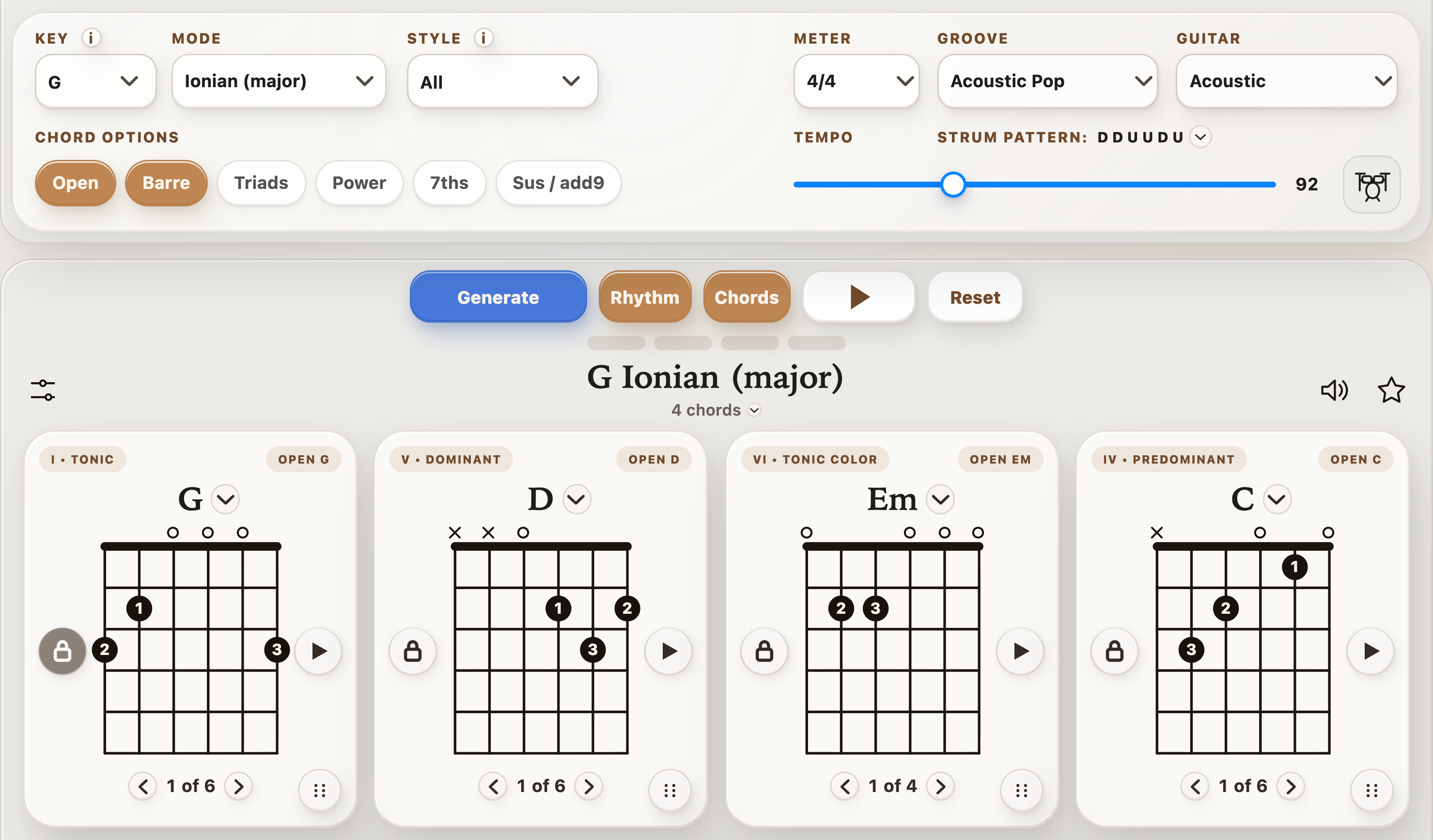
These are fixed examples rather than live random results.
Use one when you want an immediate progression to play, or generate a completely new four-chord loop above.
There are two very different ways to make a “random chord generator.”
The simplest approach is to choose chord names independently. That can produce unexpected combinations, but it can also give you four chords with little harmonic connection.
StrumForge takes a different approach.
It generates four-chord progressions using the selected musical settings as boundaries for the randomization. You can leave the key and mode open when you want a broad surprise, or constrain the generator when you already know the type of sound you want.
The goal is not to remove randomness. It is to make the random result useful enough that you can actually start playing it.
Instead of treating randomization as all-or-nothing, change the controls depending on what you are trying to do.
Key: All
Mode: Auto
Style: All
This gives the generator the widest range of possible starting points.
Use this when you have no progression in mind and want the generator to make the first decision for you.
Choose a key but leave the other controls relatively open.
This is useful when you want something new while practicing scales, improvising, writing a melody, or working within the range of an existing song.
Choose the chord families you want to practice.
Open chords for familiar first-position shapes
Barre chords for movable full voicings
Triads for smaller shapes around the neck
Power chords for riff-based playing
7ths for additional harmonic color
Sus / add9 for more open or unresolved voicings
The progression can still change while the physical type of guitar chord stays focused.
Use the Style control when you want the result to lean toward a particular musical direction without manually choosing the progression yourself.
This gives you a middle ground between a completely open random result and manually building all four chords.
For maximum variety, leave Key on All, Mode on Auto, and Style on All.
If you already know what you want to practice, select a key, mode, style, or chord family first.
Select Generate.
StrumForge creates a four-position progression and displays a playable guitar voicing for each chord.
Play the progression with the guitar and groove controls.
Sometimes a chord sequence that looks unfamiliar makes more sense once you hear it as a repeating loop.
Follow the chord diagrams and loop the progression.
Try not to immediately regenerate just because the first pass feels unfamiliar. A new progression can take a few repetitions before its character becomes obvious.
If one or two positions work particularly well, lock them.
Generate again and let StrumForge replace the remaining positions.
This lets randomness continue without losing the part that gave you the idea.
You can also:
A progression that is almost right often needs one adjustment rather than another complete regeneration.
Key: C, G, D, A, or E
Mode: Auto or Ionian
Chord type: Open
Meter: 4/4
Tempo: 60–80 BPM
Use this setup when you want changing progressions while practicing clean chord transitions and steady rhythm.
Instead of memorizing one exercise, generate a different four-chord sequence and force your fretting hand to react to a new order.
Key: All
Mode: Auto
Style: All
Chord types: Open, Barre, 7ths, Sus / add9
Meter: 4/4
Tempo: 80–110 BPM
Generate several progressions until one chord change catches your attention.
Then lock that chord or pair of chords and regenerate around it instead of searching for an entirely new progression.
Key: All
Mode: Auto
Chord type: Power
Meter: 4/4
Tempo: 90–130 BPM
Treat the generated chords as root locations rather than as a finished rhythm-guitar part.
Try:
The random progression supplies the harmonic movement. You supply the riff.
The easiest way to use a random generator badly is to press Generate over and over while waiting for a progression that sounds finished immediately.
Random generation works better as a source of raw material.
If a result has one interesting chord change, that can already be enough.
Try one of these before generating again:
A small adjustment can turn an initially strange progression into something much more useful.
The generator does not have to be used only for songwriting.
Repeatedly practicing the same progression makes the physical sequence predictable.
Generating a new progression forces you to identify each chord and make the transition without relying entirely on muscle memory from one familiar loop.
Enable Barre chords and generate a progression.
Focus on maintaining consistent pressure and releasing unnecessary tension between changes.
Enable Triads and use the generated progression as a harmonic framework.
Try playing each chord in one area of the neck, then find another set of voicings for the same four chords.
Keep the progression fixed and change only your right-hand pattern.
For example:
The harmony stays constant while the rhythmic challenge changes.
Generate a progression in a selected key, loop it, and use the scale display as a reference for improvising.
Start with a small group of notes rather than immediately trying to cover the entire fretboard.
A random chord exercise and a random chord progression solve different problems.
If the goal is simply chord recognition or fretboard practice, completely unrelated chords can be useful because you are testing your ability to find and play each shape independently.
If the goal is songwriting, jamming, melody writing, or rhythm practice, some harmonic relationship between the chords is usually more useful.
StrumForge is designed around the second approach.
It introduces enough randomness to give you combinations you may not have chosen yourself, while still treating the result as a four-chord musical progression.
Keep a result you like, choose a comfortable tempo, and open Rhythm with the drum-kit button beside BPM. Choose a groove, then press Play: the guitar chords and sampled drums share the loop’s tempo and meter.
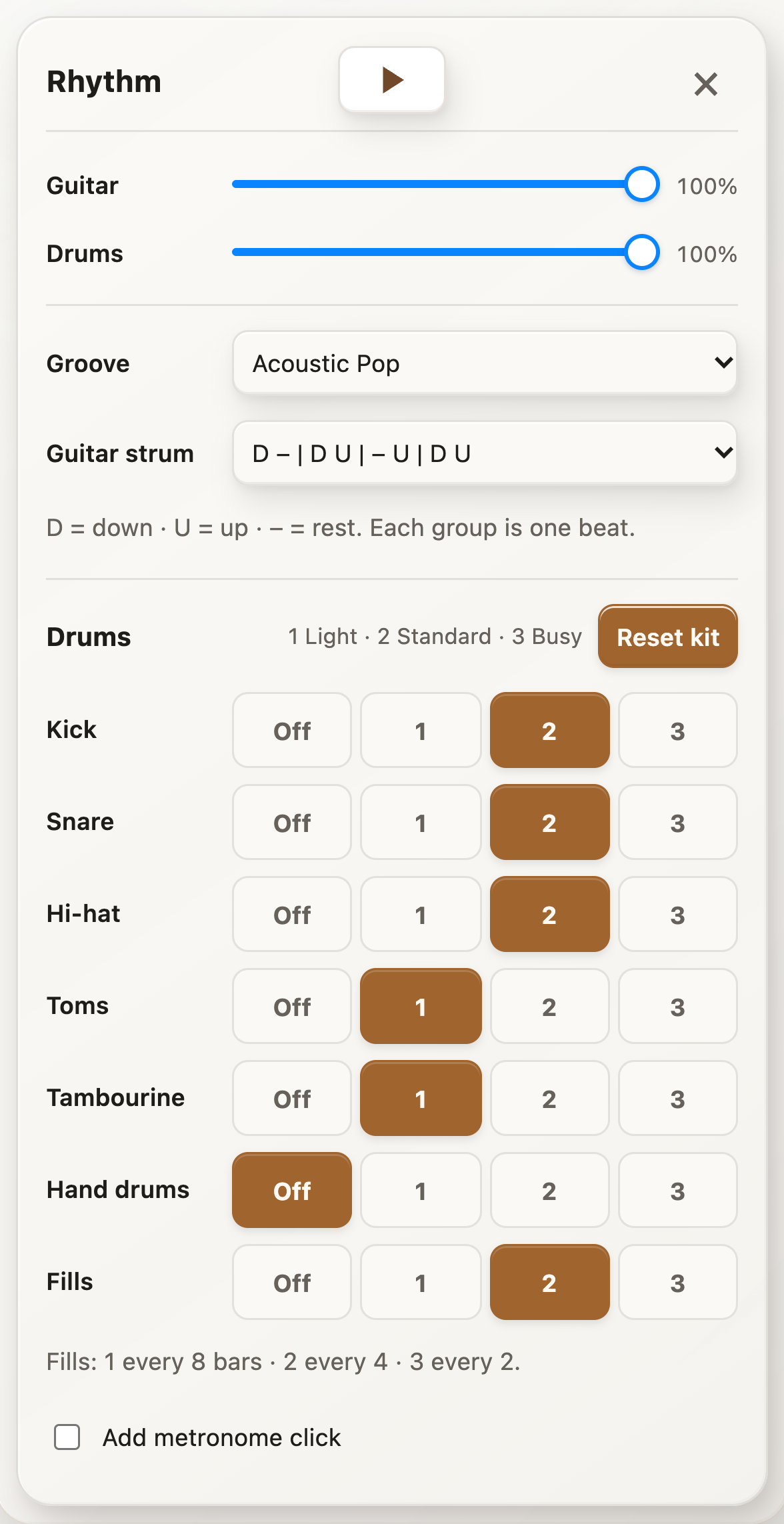
Acoustic Pop, Waltz, and 6/8 Ballad include free playback with their default kits and recommended strums. Additional sampled grooves, kit and fill edits, independent strum choices, and volume changes require StrumForge Pro.
Not completely. StrumForge introduces randomness within the musical settings you choose. Depending on the configuration, the generator can use key, mode, style, and chord-type information when creating the four-chord result. This preserves the element of surprise without treating every chord as an unrelated random choice.
StrumForge starts with four chords. Four-chord loops are free; Pro adds two-, eight-, twelve-, and sixteen-chord progressions. You can reorder them, replace individual chords, change voicings, or lock positions and generate again.
Yes. Choose the key before generating if you want the random progression to stay focused around a particular tonal center. Leave Key set to All when you want the generator to choose more freely.
Yes. Available options include Open, Barre, Triads, Power, 7ths, and Sus / add9. You can limit the generator to the chord families you want to practice or combine multiple types for more variety.
Yes. A simple starting setup is to select C, G, D, A, or E, enable Open chords, and use a slower tempo. The guitar diagrams remain visible while the progression plays.
Yes. StrumForge provides guitar playback, groove playback, tempo controls, meter selection, and visual highlighting of the active chord.
Yes. Lock the chord positions you want to keep and generate again. The locked positions remain while the progression is regenerated around them when possible.
Yes. You can manually replace an individual chord instead of generating an entirely new progression. This is useful when three positions work and only one feels wrong.
Yes. Reorder the four chord positions to hear how the same harmonic material changes when a different chord starts or ends the loop.
Yes. They are useful for practicing chord changes, rhythm, barre chords, triads, improvisation, and reacting to progressions you have not memorized in advance.
The web generator is free to start without ads. Free generation limits may apply, while StrumForge Pro provides unlimited generation and additional features.