

Chord maker
Use this when you want to choose a chord such as G, Dsus4, Cmaj7, or Asus2 and understand how it can sit inside a guitar part.
Guitar songwriting
Use StrumForge as a guitar chord maker, chord creator, and chord builder for playable progressions: choose chords, hear the loop, compare diagrams, and turn ideas into practice.
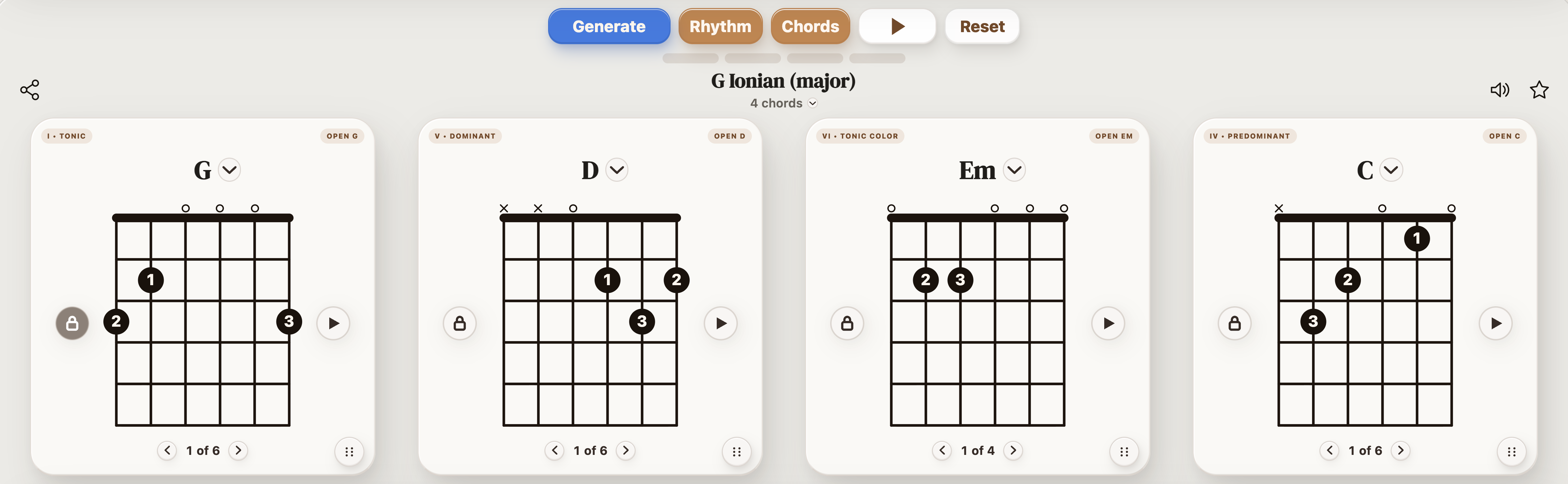
Use these as practical starting points when you want to make chords, build a progression, or turn chord ideas into a playable guitar part.
Most guitar chord maker searches are really asking for one of three workflows: find a chord shape, build a progression, or create a playable writing/practice loop.
Use this when you want to choose a chord such as G, Dsus4, Cmaj7, or Asus2 and understand how it can sit inside a guitar part.
Use this when you want to try a few chord colors, then hear whether they actually work together in a loop.
Use this when you want control over voicing families: open chords, barre chords, triads, power chords, sevenths, suspended chords, and add9 color.
A single chord is rarely the final answer. Put it before and after other chords, set a tempo, then decide whether the movement feels good under your hands.
| When you need... | What to do on guitar |
|---|---|
| To get the idea under your hands | Play one guitar chord maker and chord builder example slowly with a single voicing family before changing anything else. |
| To make the part cleaner | Fix the weakest chord change or rhythm accent first, then return to the full progression. |
| To make it your own | Change one variable at a time: key, capo position, rhythm, register, chord color, or scale focus. |
| To test it in StrumForge | Open a related loop when you want diagrams, groove playback, and timing practice. |
Use the page as a starting point, then move into the app when you need sound, timing, diagrams, and scale context.
Short answers for players using this page as a practice or writing reference.
Start with a small group of playable chords, hear them in a loop, then change only one variable at a time: key, voicing, rhythm, or chord color.
StrumForge is best understood as a guitar chord progression maker and chord builder: it helps you choose chords, compare shapes, hear the loop, and practice the result rather than only naming one isolated chord.
Yes. Once the loop works, change key or capo position so the idea becomes a fretboard exercise instead of a memorized shape.