

Not a DAW
Use recording software for vocals, guitar takes, editing, mixing, and finished demos.
Guitar songwriting
StrumForge helps guitarists turn blank-page harmony into a loop they can hear, play, revise, and build into a song section.
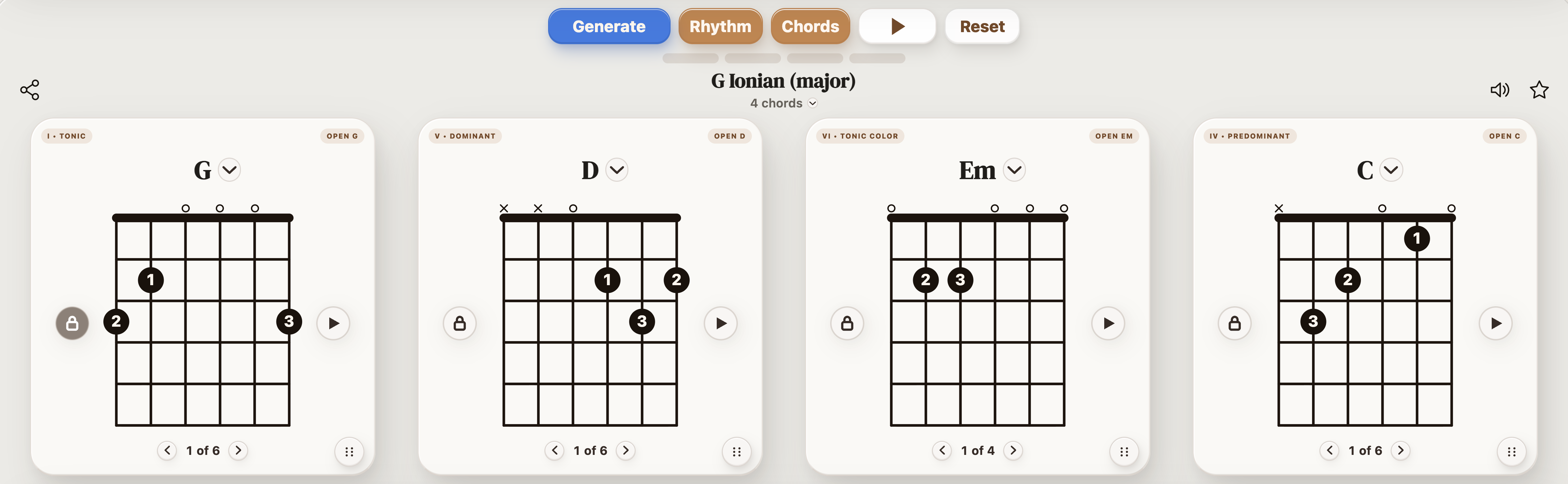
Use StrumForge when you need a songwriting app for guitar chord progressions, especially at the start of a session. It is built for finding playable loops, hearing the groove, checking guitar shapes, changing weak chords, and using scale context for melody or lead ideas.
Most guitar songs need a playable harmonic center before they need production.
| Songwriting stage | How StrumForge helps |
|---|---|
| Finding the first loop | Generate a chord progression and hear whether it has a verse, chorus, bridge, or vamp feel. |
| Testing playability | Use diagrams and voicing choices to decide whether the part works under your fingers. |
| Improving the hook | Change one chord, voicing, key, or groove while keeping the useful part of the idea. |
| Writing around the loop | Use the scale context to sketch melody notes, lead fills, or improvisation ideas. |
| Moving to production | Take the progression into a recorder or DAW once it is strong enough to track. |
StrumForge is strongest before the song becomes a full production project.
Use recording software for vocals, guitar takes, editing, mixing, and finished demos.
Use it to support the harmonic side of writing, then pair it with your lyric or notes workflow.
Use notation software when the song needs score layout, parts, or formal arrangement detail.