Hear the change coming
Chord diagrams stay on screen while playback highlights the active chord. Use the repeating progression to practice arriving at each change with the beat.
Guitar practice app with drum backing
Hear the chord changes. Feel where the backbeat lands. StrumForge pairs playable guitar diagrams with drum backing, so a chord-change drill can feel like playing a part in a song.


For iPhone, iPad, Android & web.
Start with free drum grooves. Custom kits, fills, independent strums, and mix controls require Pro.
Open StrumForge in your browser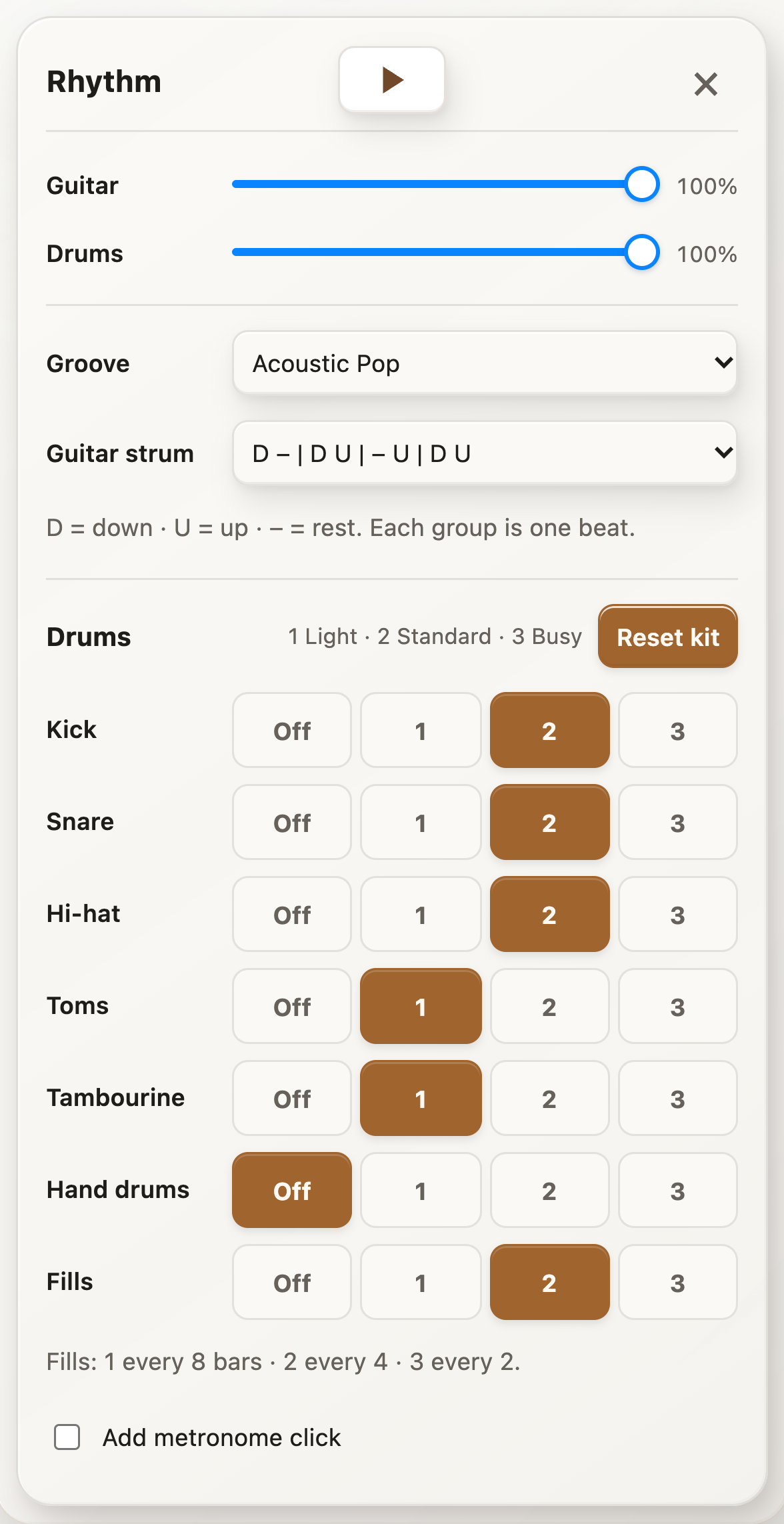
Built for the way you practice
Set up a progression, choose a groove, and start playing. Change the backing as your practice changes—from steady chord transitions to strumming, fills, and lead ideas.
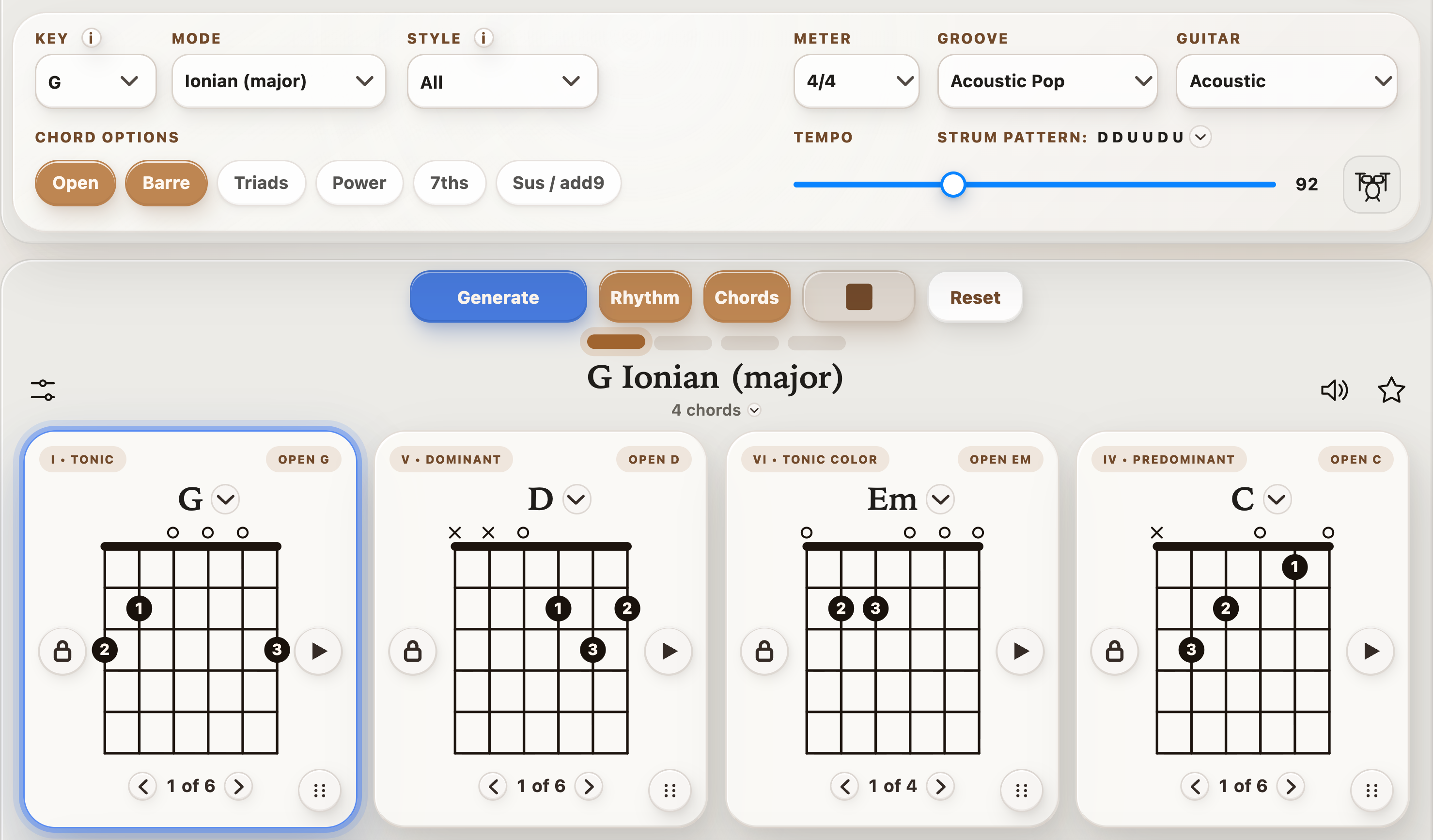
Chord diagrams stay on screen while playback highlights the active chord. Use the repeating progression to practice arriving at each change with the beat.
Start with Acoustic Pop, Waltz, or 6/8 Ballad using the free default kits and recommended strums. Set the BPM to a pace where you can keep your part steady.
With Pro, lower the app’s guitar volume and keep the drums up to play the chords yourself. Or keep both parts audible while you try melodies over the progression.
Open the G–D–Em–C example below, or build a progression of your own. Pick shapes you can already play so you can focus on landing each change.
Tap the drum-kit button beside BPM to open Rhythm. Start with Acoustic Pop at a comfortable tempo and the recommended guitar strum.
Follow the active chord through a few loops. With Pro, adjust the guitar/drums balance, simplify a busy kit part, or add a fill to mark the next phrase.
Make it your session
Pro lets you set each kit part to Off, Light, Standard, or Busy; add fills every eight, four, or two bars; and choose the guitar strum independently. Keep the groove simple while learning a change, then add movement when your part feels settled.
Choose your starting point
Yes, with Pro. Lower the Guitar volume in the Rhythm panel and keep the Drums volume up, then play your own chord or lead part over the backing.
Yes. The drum groove follows the progression’s tempo and meter. Choose your BPM, open Rhythm, and select a groove for your practice loop.
Acoustic Pop, Waltz, and 6/8 Ballad are available with their default kits and recommended guitar strums. Additional grooves, custom kit parts, fills, independent strum choices, and volume changes require Pro.
Yes, with Pro. Set kit parts to Off, Light, Standard, or Busy, and choose fills every eight, four, or two bars. You can also select the guitar strum separately from the groove.
Your next practice starts here
Pick a progression, put a groove behind it, and make your next practice session feel more like playing music.
Start with free drum grooves. Custom kits, fills, independent strums, and mix controls require Pro.
Or open StrumForge on the web →