Choose the size of the step
Set a positive BPM change to speed up gradually, or a negative change to slow down. Small steps give you room to notice whether your notes still sound clean.
Metronome app with automatic tempo increase
Keep your hands on the guitar while the tempo moves forward. Set a BPM increase, choose how many bars to stay there, and let StrumForge’s tempo trainer work toward your target.


For iPhone, iPad, Android & web.
The app is free to download. Metronome playback, controls, and tempo training require StrumForge Pro.
Open StrumForge in your browser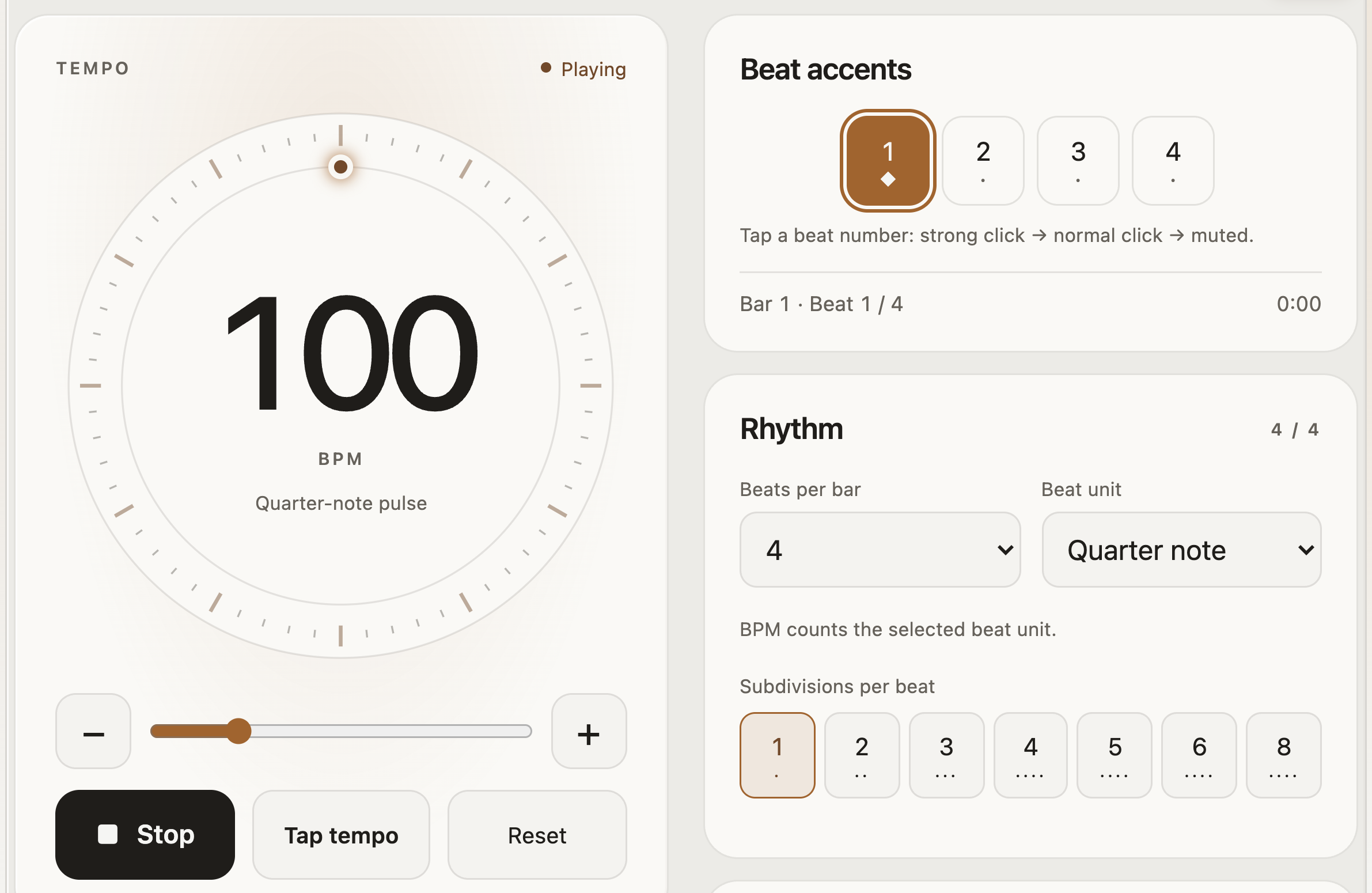
Built for the way you practice
Use a measured tempo increase for alternate picking, a tricky chord change, or a short passage. You decide the starting point, the size of each step, and when the climb ends.
Set a positive BPM change to speed up gradually, or a negative change to slow down. Small steps give you room to notice whether your notes still sound clean.
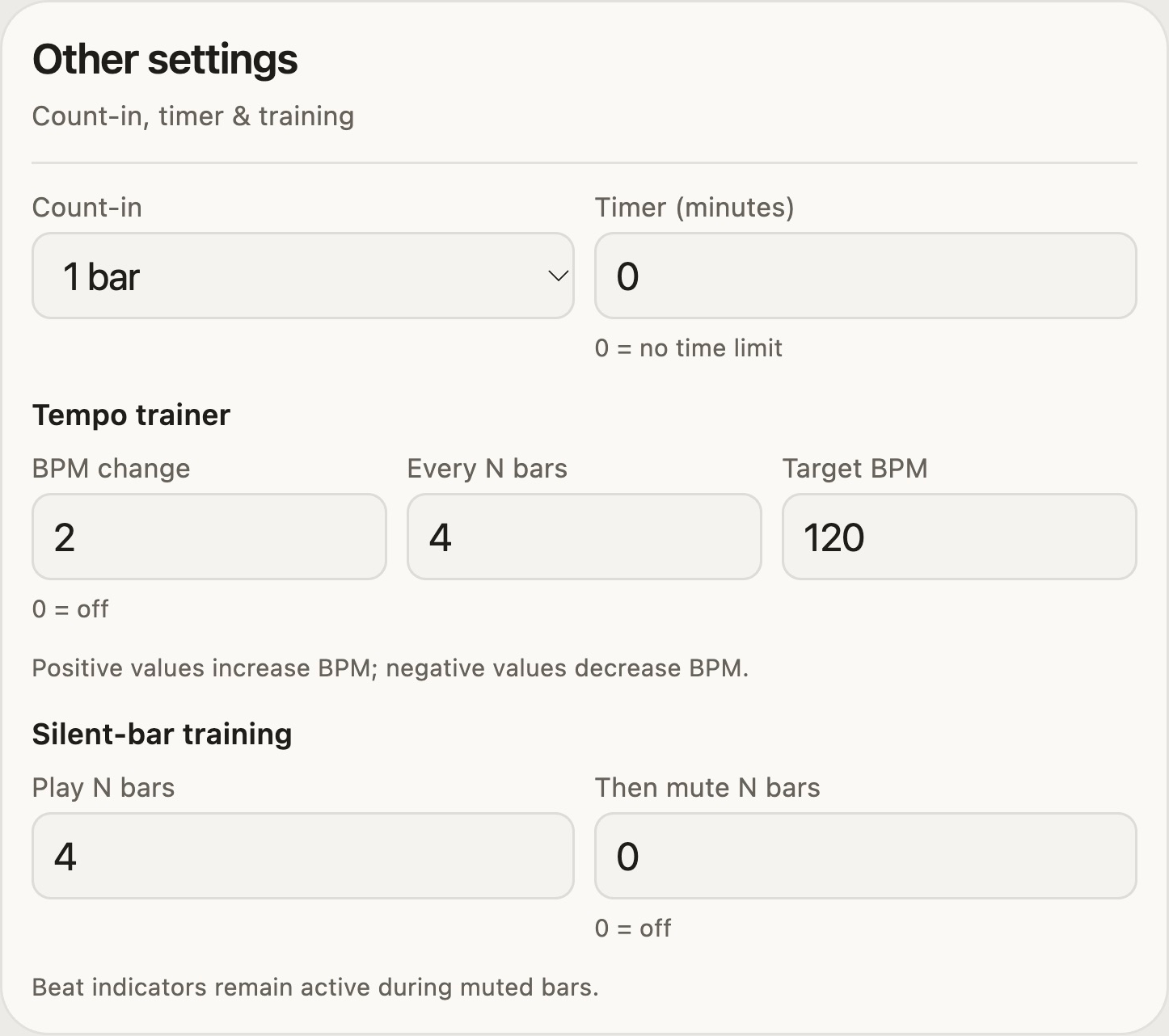
Choose how many bars play before each change. Add a count-in to get your hands ready; the trainer starts counting its bars after the count-in finishes.
Set a target BPM so the trainer stops increasing at the tempo you chose. Stopping playback returns to your starting tempo, ready for another run.
Put it into practice
Open the Metronome from the app’s navigation or menu. With Pro, set the starting tempo to 100 BPM, four beats per bar, and a quarter-note pulse. Use a slower starting tempo if your part needs it.
In Other settings, set BPM change to 2, Every N bars to 4, and Target BPM to 120. Add a one-bar count-in so you can settle in before the exercise starts.
Play the same short part while the tempo increases. Stop when the notes become uneven, return to a comfortable pace, and adjust your target for the next run.
Make it your session
Save a named preset with your rhythm and training settings, then return to the same setup next time. Add a practice timer, change the click voice, or alternate audible and silent bars to test whether you can hold the pulse without hearing every beat.
Choose your starting point
Yes, with StrumForge Pro. Set the BPM change, the number of bars between changes, and a target BPM in Other settings. A positive change increases the tempo automatically until it reaches your target.
Yes. Use a negative BPM change and choose a lower target. Set the change to zero to turn off tempo training and keep a steady tempo.
No. The count-in finishes first. The trainer then counts completed practice bars and applies tempo changes at bar boundaries. Stopping playback restores your starting tempo.
You can download the app and preview the metronome screen for free. Metronome playback, settings, saved presets, and automatic tempo training require StrumForge Pro.
Keep StrumForge open while practicing. Metronome playback stops when you leave the view, background the app, or an audio interruption occurs.
Your next practice starts here
Give your next practice session a starting tempo, a measured increase, and a clear target with StrumForge Pro.
The app is free to download. Metronome playback, controls, and tempo training require StrumForge Pro.
Or open StrumForge on the web →