Follow one note at a time
Hear the scale and follow the active note on the fretboard. Start slowly enough to place each finger cleanly, then repeat the shape without rushing the string changes.
Guitar scale trainer with playback
A scale diagram shows you where to play. StrumForge adds a note to follow and a tempo to work toward. Hear each note, watch it light up, and practice one position until the movement feels familiar.


For iPhone, iPad, Android & web.
Free to start. Scale-shape playback and interactive scale practice require StrumForge Pro.
Open StrumForge in your browser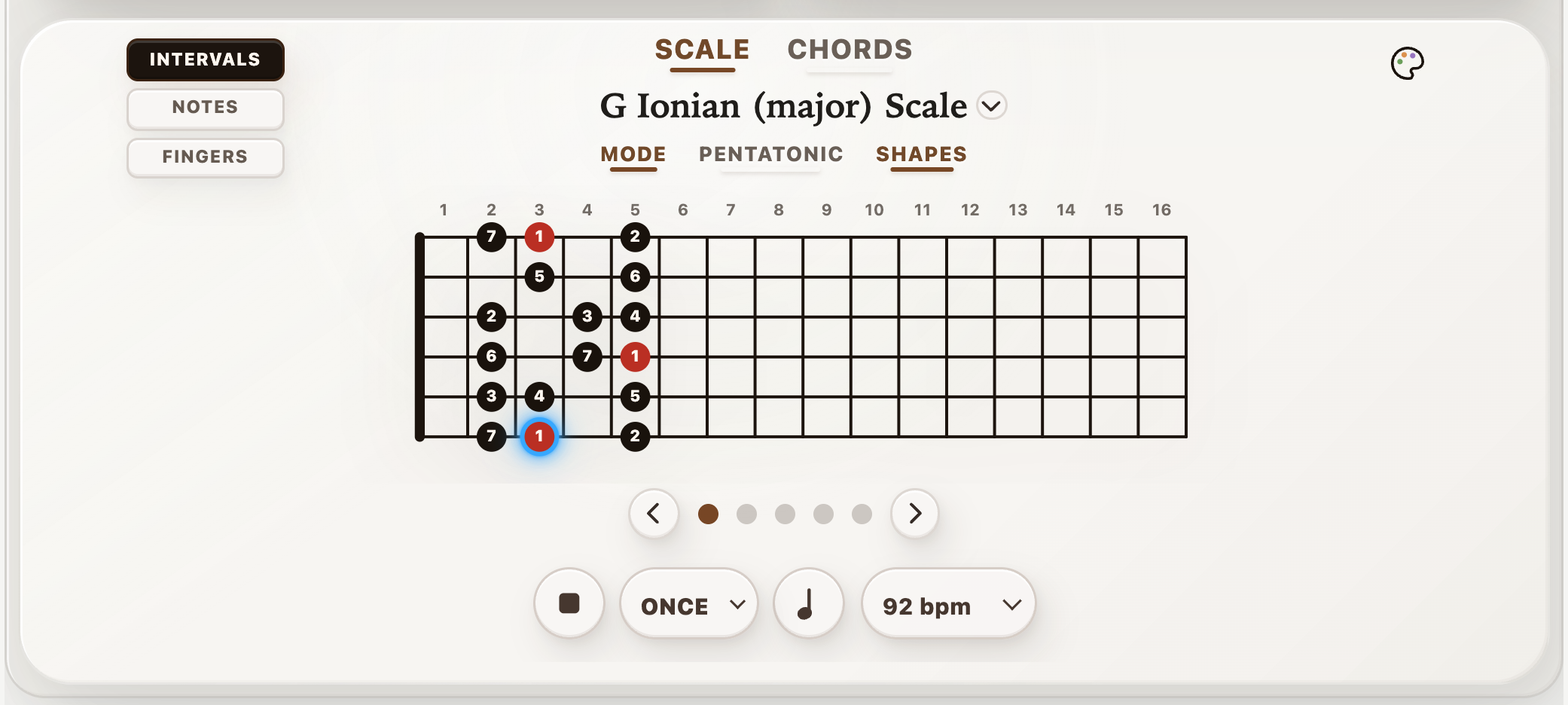
Built for the way you practice
Use the same fretboard shape in three ways: as a route for your fingers, a set of note names, and a map of intervals. Change the labels as your attention shifts.
Hear the scale and follow the active note on the fretboard. Start slowly enough to place each finger cleanly, then repeat the shape without rushing the string changes.
Switch between Intervals, Notes, and Fingers. Learn where the root sits, recognize the scale degrees around it, and connect the pattern to the notes you hear.
Explore modes, pentatonic and blues scales, and CAGED shapes. Repeat a single shape or use the All playback option to work through the positions.
Put it into practice
Open StrumForge and choose a scale in the Scale controls. Start with G major and one CAGED shape. Keep interval labels on so you can find the root.
With Pro, choose a slow playback tempo and quarter notes. Follow the highlighted note through the shape. Keep each note clear before increasing the pace.
Loop the shape until the route feels familiar. Switch to note names, or move to the next position and find the same root notes again.
Make it your session
Once you know a shape, give it a musical job. Open a chord progression in the same key and use a few scale notes to make short phrases. Leave space, repeat an idea, and listen to how the notes sit over each chord.
Learn to practice scales over chord progressions →Choose your starting point
Yes. With StrumForge Pro, scale-shape playback sounds the notes and highlights the current note on the diagram. You can adjust the tempo, choose rhythmic note values, and repeat a shape or work through positions.
StrumForge includes modes, pentatonic and blues scales, and CAGED scale shapes. Choose a key and scale, then switch between interval, note-name, and fingering labels.
No. The scale trainer provides diagrams, audio playback, and visual guidance. You judge your own note clarity and timing as you play along.
Yes. StrumForge is available on iPhone, iPad, Android, and the web. The app is free to start; interactive scale practice and playback require Pro.
Your next practice starts here
Keep the shape, the sound, and the pulse in one place. Download StrumForge and explore the fretboard at your own pace.
Free to start. Scale-shape playback and interactive scale practice require StrumForge Pro.
Or open StrumForge on the web →