Generate chord progressions, explore scales, and learn triads and arpeggios with interactive fretboard diagrams and playback. Practice with drum grooves, a metronome, and a built-in guitar tuner.
Chord Progressions
Current keyLoading…
GrooveGroove 1
Mode
Ionian (major)
Chord options
Tempo controls
Tempo
Strum pattern:
Favorites
Tap a folder to expand it, or drag a progression grip to reorder it or move it into another folder.
Saved progressions will appear here.
Tuner
GUITAR TUNERMic off
—
—cents
♭ FLAT0SHARP ♯
−50−25cents+25+50
Start listening, then pluck a string.
Waiting for a note
i
Sets the reference pitch for all notes. Usually 440 Hz, including alternate tunings. Change only to match another instrument or a specified tuning reference.
STRINGS · LOW TO HIGH
Auto-detect, or tap a string to lock
Microphone audio stays on your device.
Practice Sessions
Generating progression…
Guitar practice tools for better playing and fresh ideas.
Turn chord progressions into songs and fretboard patterns into music. StrumForge brings a chord progression
generator, triad and arpeggio trainers, scale tools, a metronome, and a guitar tuner into one practice app.
Practice
Build clean chord changes and steady timing with interactive diagrams, drum grooves, and a full-featured metronome.
Songwriting
Generate guitar chord progressions, keep the chords you love, and explore new voicings with instant playback.
Improvisation
Connect scales, triads, and arpeggios across the fretboard, then turn chord tones into melodies over a progression.
Upgrade to StrumForge Pro
Use the native apps when you want unlimited generation, saved favorites, more sounds, sync, and practice tools that stay with you.
Follow StrumForge
For short guitar playing tips, ideas, and feature demonstrations, check out StrumForge on social media:
Explore your fretboard. Shape your sound.
Create chord progressions in your key and mode, with playable voicings and groove playback.
Learn inversions and chord tones with the guitar triad trainer, arpeggio trainer, and interactive scale tools.
Fine-tune your rhythm with metronome controls, and explore alternate tunings like Drop D and DADGAD with the built-in guitar tuner.
Choose which shortcuts to display at the top of the app.
Default Settings
Choose the default settings used when the app opens.
Interested in StrumForge Pro?
Already have StrumForge Pro?
Sign in to access your subscription or lifetime purchase.
StrumForge Pro
StrumForge ProPractice without limits
StrumForge Pro is not active on this device.
One payment. Lifetime Pro access.
Sign in to use StrumForge Pro on web, iOS, and Android.
Sign in or create a StrumForge account to connect your purchase.
Already have an account? Use your original sign-in method.
Already purchased? Help accessing Pro
Use the same sign-in method and account you used before. New accounts can use these options too.
Purchased on the website
Sign in on this device with the StrumForge account used at checkout. No store restore is needed.
Purchased in the app
In the app where you purchased Pro, restore purchases if needed, then sign in to connect Pro to an account. Use that same account on your other devices.
Already connected? Just sign in with the same StrumForge account.
Still need help?
If you used Sign in with Apple, choose Apple again. Your account may use an Apple private email address.
If your purchase is missing or you cannot access the original device, contact support before purchasing again.
Save, organize, share, and revisit favorite chord progressions
Enjoy more groove and guitar voice options
Built-in tuner, additional scale diagram views, dark mode
Set and sync settings and favorites across all of your devices
Unlock Pro and take your guitar practice further.
Pro includes everything in the free version, plus:
Unlimited & longer progressionsGenerate as many as you want, with 4, 8, or 12 chords.Save, revisit & shareSave your favorite progressions and come back anytime.Triad & arpeggio trainersPractice shapes, inversions, and chord tones with playback.Sync across devicesSync favorites and preferences across all your devices.Styles for every moodCreate progressions based on musical style or mood.Tuner & metronomeTune your guitar and build steady timing.Dark modePractice comfortably in any lighting.Advanced scale toolsExplore shapes and fingerings with color-highlighted intervals.More guitar sounds12-string, overdrive, and more high-quality tones.Custom defaultsSet your preferred default settings and preferences.
Pro plans
$49.99lifetime
$24.99/ year
7-day free trial$2.99/ week after trial
Cancel anytime
Secure payment
StrumForge Pro
Lifetime Pro
Keep all Pro features with one payment.
StrumForge
How to use StrumForge
Start with Generate to create a new chord progression, then narrow it with key, mode,
chord-shape filters, chord color, and playback settings. The controls on each chord card let you
keep what is working, hear single chords, and rearrange the progression.
Want the onboarding guide again? Run the onboarding flow any time.
Main controls
C
Key
Choose the tonal center. Leave it set to All if you want Generate to choose from any available key.
Ion
Mode
Change the harmonic character. You can choose one mode or several before tapping Done.
L/R
Display
Flip diagrams between right-handed and left-handed views.
Open
Chord options
Control what kinds of shapes and colors Generate is allowed to use, like open chords, barre shapes, 7ths, and sus or add9 colors.
Chord card controls
Lock
Keep that chord in place when you generate a new progression.
Play chord
On the chord diagrams, hear how that chord sounds on its own without starting the full progression playback.
Voicing arrows
Cycle through other playable shapes for the same chord based on the chord options you currently have selected.
Drag to reorder
Touch and drag the grip to move a chord to a new position in the progression.
Tap the diagrams
Tap the chord or scale diagrams to open a larger view for easier reading and quick preview, and swipe sideways there to cycle through the progression.
Cmaj7
Chord name
Tap the chord label to replace that slot manually when you want a more specific progression.
Playback and theory
Generate
Generate
Build a new four-chord progression using the current filters. Locked chords are kept when possible.
Rhythm
Rhythm
Turn the drum groove on or off during playback.
Chords
Chords
Turn the chord audio on or off during playback.
Play / Stop
Start or stop the full progression loop.
Reset
Reset
Clear your current progression and recent control changes so you can quickly start over.
4/4
Meter
Choose the time signature for playback, such as 4/4, 3/4, or 6/8.
Groove
Groove
Select the rhythm pattern that the progression plays against.
Guitar
Guitar
Change the guitar sound used for chord playback.
92
Tempo
Use the slider and tempo number to slow the loop down for practice or speed it up for a challenge.
Pattern
Strum pattern
Shows the current strum pattern for the selected groove so you can see the rhythmic feel you are hearing.
Scale
Scale / Chords
Use the lower panel buttons, or swipe sideways, to move between the scale diagram and the chords in the current key.
Mode
Mode / Pentatonic
Switch the lower theory panel between the full mode scale and a pentatonic view.
The StrumForge app does not require an account and does not collect personal information
to generate chord progressions or run playback.
The app runs locally on your device and does not upload your generated progressions or practice activity to StrumForge servers.
No third-party analytics SDKs, ad SDKs, or in-app tracking technology are included.
Optional premium purchases and subscriptions are processed by Apple, Google, Stripe, and RevenueCat where available. StrumForge uses RevenueCat to check Premium status, restore purchases, and provide purchase or subscription management.
Optional StrumForge accounts may use Apple, Google, or email sign-in through Supabase so Premium access can work across web, iOS, and Android. Signed-in users can delete their StrumForge account from Menu > Pro & Account in the mobile app or Menu > Account on the website.
Free generation limit state may be stored locally, and the website may use anonymous account identifiers to keep free usage limits consistent during normal browsing sessions.
The premium tuner requests microphone access only when you start it. Pitch detection runs locally on your device and microphone audio is not uploaded or saved by StrumForge.
StrumForge does not request access to contacts, photos, camera, location, or similar sensitive device data.
Your settings may be stored locally on your device so the app can restore preferences the next time you open it.
If you email support, StrumForge may receive the information you choose to send, including your email address, device details, and message contents, and use it only to respond and troubleshoot.
StrumForge does not sell personal information. Limited information may be handled by infrastructure providers only as needed to deliver the website, app distribution, or support email.
Support correspondence may be retained only as long as reasonably necessary to respond, troubleshoot, keep support records, and improve the app.
StrumForge is not directed to children under 13 and does not knowingly collect personal information from children.
By using StrumForge, you agree to use the app responsibly and understand that generated music ideas,
diagrams, tuner readings, and practice tools are provided as-is for learning and creative work.
Premium access is optional and is managed through the app store account or web account used to purchase it.
Free users may have daily chord progression generation limits. Existing grandfathered users and Premium users keep unlimited generation.
Subscriptions renew unless canceled through the app store before the renewal date.
Availability, feature names, and included premium features may change as StrumForge evolves.
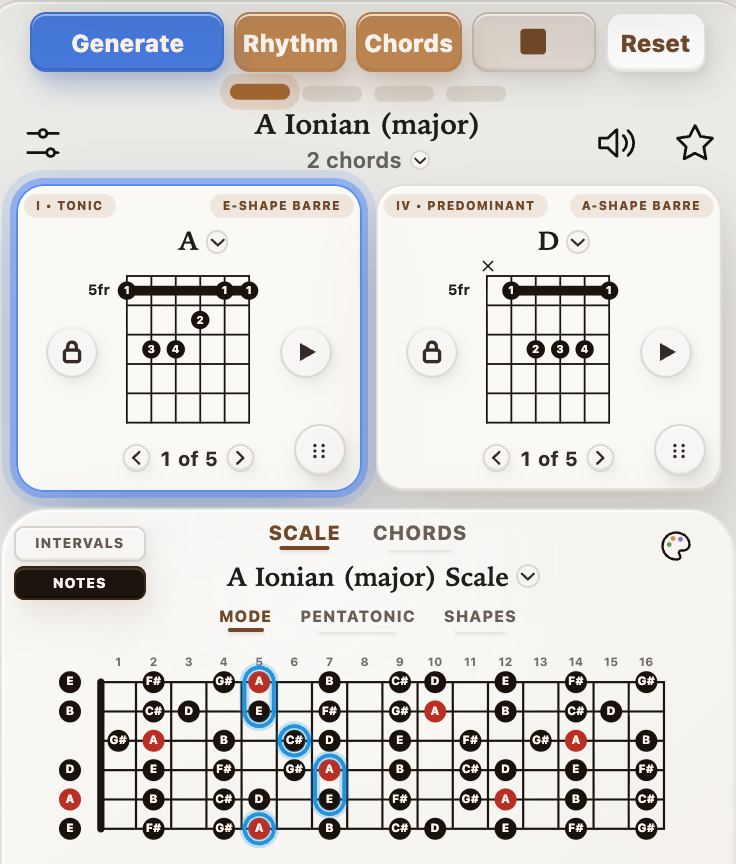
Generate 4-chord progressions, or 8 and 12 with Pro. Play along with adjustable groove, tempo, and guitar sound.
Free includes 5 progression generations per day.
Playback controls with guitar chord progression
See exactly what to play.
Follow clear chord diagrams and matching scale shapes. Tap the scale name to choose a different scale to practice.
Chord diagrams with matching scale shape
Master the fretboard
Learn and practice scale shapes across the entire neck. Select 'Shapes' in the Scale section and use the playback controls to fine-tune your practice.
Scale shape playback controls across the fretboard
Discover new triad voicings.
Use the Triad Trainer mode to compare inversions in any key and hear each shape strummed or arpeggiated.
Explore triad shapes, inversions, and playback.
Practice arpeggios across the neck.
Learn arpeggio shapes in any key. Follow color-coded notes and loop playback at your own pace.
Arpeggio Trainer
Unlock unlimited practice.
Generate unlimited progressions, save favorites, unlock advanced tools, and keep everything synced across devices.
Remove daily limits with StrumForge Pro.
Free and Pro feature comparison
New in StrumForge
Language Support
StrumForge now supports multiple languages.
Choose your default language below. You can change this at any time in Menu > Settings.
New Feature: Practice Scale Shapes
Scale shapes can now play note-by-note so you can practice along in time. Select 'Shapes' in the Scale section, set the BPM, choose once, loop, or all shapes, and follow the highlighted notes on the fretboard.
Pro Note: This is a StrumForge Pro feature. Start a free trial to check it out.
New Feature: Triad Trainer
Explore triad shapes across the fretboard in any key. Choose a root, quality, and string set, compare inversions, switch between intervals and note names, and hear each shape strummed or arpeggiated. Tap the triangle icon at the top of the app to begin.
Pro Note: Triad Trainer is available with StrumForge Pro. Start a free trial today to try it out.
New: 8- & 12-Chord Progressions
Build longer progressions for practice and songwriting. Choose 8 or 12 from the dropdown beneath the progression title.
Available with StrumForge Pro.
New tools for your practice
Arpeggio Trainer
Practice chord tones with movable shapes and tempo-controlled playback.
Tuner
A clearer tuning display, plus reference tones.
Metronome
Keep time with accents, subdivisions, and saved presets.
8- & 12-Chord Progressions
Choose 8 or 12 chords from the menu beneath the progression title.